
Subaru Forester 2019-2026 Owners Manual / Instruments and controls / Warning and indicator / Charge warning light
Subaru Forester: Warning and indicator / Charge warning light

If this light illuminates when the engine is running, it may indicate that the charging system is not working properly.
If the light illuminates while driving or does not turn off after the engine starts, stop the engine at the first safe opportunity and check the alternator belt. If the belt is loose, broken or if the belt is in good condition but the light remains illuminated, contact your nearest SUBARU dealer immediately.
 Coolant temperature low indicator light/Coolant temperature high warning
light
Coolant temperature low indicator light/Coolant temperature high warning
light
CAUTION
After turning the ignition switch
to the “ON” posit..
 Oil pressure warning light
If this light illuminates when the engine is
running, it may indicate that the engine oil
pressure is low and the lubricating system
is not working properly...
Other information:
Subaru Forester 2019-2026 Owners Manual: Auto Vehicle Hold ON indicator light
CAUTION If the Auto Vehicle Hold ON indicator light does not illuminate even when the Auto Vehicle Hold switch is pressed to activate the Auto Vehicle Hold function, the electronic parking brake system may be malfunctioning. This indicator light illuminates when the Auto Vehicle Hold is activated...
Subaru Forester 2019-2026 Owners Manual: Cruise control indicator light (if equipped)
This light illuminates when the cruise control main button is pressed to activate the cruise control function. For details, refer to “To set cruise control”. If this light blinks, do not use the cruise control. In addition, if it blinks frequently, contact your SUBARU dealer for an inspection...
Categories
- Manuals Home
- RAB warning light (if equipped)
- To activate/deactivate the X-MODE
- All-Wheel Drive warning light
- New on site
- Most important about car
Type B multi-function display (color LCD)
Turn the ignition switch to “ON”.
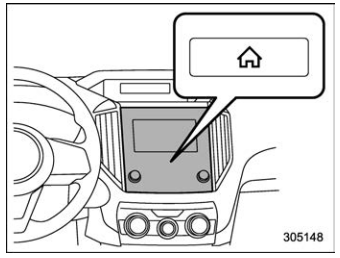
 button.
Select “Settings”.
Select “Vehicle”.
Select “Time/Date” and then select “Manual”.
button.
Select “Settings”.
Select “Vehicle”.
Select “Time/Date” and then select “Manual”.
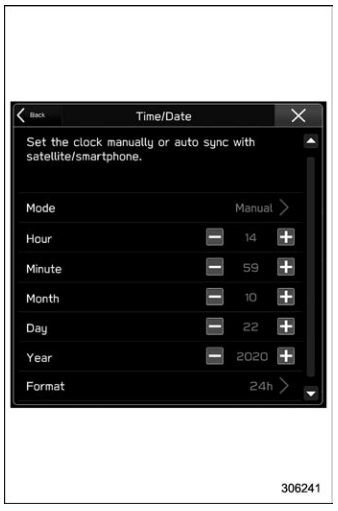
 to complete the
clock
setting.
to complete the
clock
setting.

Copyright © 2026 www.suforester5.com