
Subaru Forester 2019-2026 Owners Manual / Instruments and controls / Warning and indicator
Subaru Forester: Instruments and controls / Warning and indicator
- Initial illumination for system check
- Seatbelt warning light and chime
- SRS airbag system warning light
- Front passenger’s frontal airbag ON and OFF indicator lights
- CHECK ENGINE warning light/Malfunction indicator light
- Coolant temperature low indicator light/Coolant temperature high warning light
- Charge warning light
- Oil pressure warning light
- Engine low oil level warning light
- Windshield washer fluid warning light
- AT OIL TEMP warning light
- Low tire pressure warning light (U.S.-spec. models)
- ABS warning light
- Brake system warning light (red)
- Electronic parking brake light
- Auto Vehicle Hold ON indicator light
- Auto Vehicle Hold operation indicator light
- Depress brake indicator light (if equipped)
- Low fuel warning light
- Door open warning light
- Engine hood open warning light
- All-Wheel Drive warning light
- Power steering warning light
- Vehicle Dynamics Control warning light/Vehicle Dynamics Control operation indicator light
- Vehicle Dynamics Control OFF indicator light
- Warning chimes and warning indicator of the keyless access with push-button start system (if equipped)
- List of warnings
- Security indicator light
- SI-DRIVE indicator light
- Select lever/gear position indicator
- Turn signal indicator lights
- High beam indicator light / High beam assist indicator light (if equipped)
- Cruise control indicator light (if equipped)
- Automatic headlight beam leveler warning light / LED headlight warning light
- Steering Responsive Headlight warning light / Steering Responsive Headlight OFF indicator light
- Front fog light indicator light / Headlight indicator light(if equipped)
- Auto Start Stop warning light/Auto Start Stop OFF indicator light (yellow)
- Auto Start Stop indicator light (green)
- Auto Start Stop No Activity Detected indicator light
- X-MODE indicator light (if equipped) / Hill descent control indicator light (if equipped)
- BSD/RCTA warning light (if equipped)
- RAB warning light (if equipped)
- Driver Monitoring System operation indicator light (green)/Driver Monitoring System warning light (yellow) (if equipped)
- Driver Monitoring System OFF indicator light (if equipped)
- Driver Monitoring System temporary stop indicator light (if equipped)
- Icy road surface warning light (if equipped)

 Initial illumination for system check
Several of the warning and indicator lights
illuminate when the ignition switch is
initially turned to the “ON” position. This
permits checking the operation of the
bulbs...
Other information:
Subaru Forester 2019-2026 Owners Manual: If you have accidentally triggered the alarm system. Valet mode
If you have accidentally triggered the alarm system To stop the alarm Do any of the following operations: Press any button on the access key fob/ remote transmitter. Turn the ignition switch to the “ON” position (models without “keyless access with push-button start system”)...
Subaru Forester 2019-2026 Owners Manual: Where to place a child restraint system
The following are SUBARU’s recommendations on where to place a child restraint system in your vehicle. WARNING Several types of child restraint systems may conceal the buckle of the neighboring seat. If the occupant of the neighboring seat cannot correctly fasten the seatbelt, that person must move to a different seat...
Categories
- Manuals Home
- Low fuel warning light
- Instrument panel
- How to use the high beam assist function
- New on site
- Most important about car
Clock/date screen
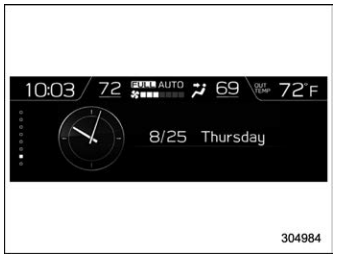
The time and date are displayed. You can adjust the time and date. For details, refer to “Clock”.

Copyright © 2026 www.suforester5.com