
Subaru Forester: Instruments and controls / Illumination brightness control
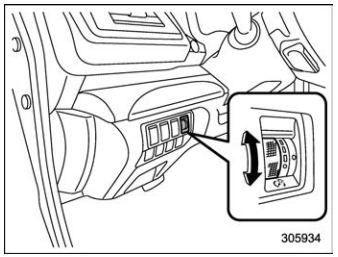
The illumination brightness of the instrument panel illuminates under the following conditions.
- The light switch is in the
 or
or  position when the ambient
light is dark.
position when the ambient
light is dark. - The light control switch is in the “AUTO”position and the headlights illuminate automatically.
You can adjust the illumination brightness for better visibility.
To brighten, turn the control dial upward. To darken, turn the control dial downward.
NOTE
- When the control dial is turned fully upward, the illumination brightness becomes the maximum and the automatic dimming function does not work at all.
- The brightness setting is not canceled even when the ignition switch is turned to the “LOCK”/“OFF” position.
Auto dimmer cancel function
When the ambient light is bright, the illumination brightness is set to the maximum regardless of the position of the control dial. In this case, you cannot adjust the illumination brightness by using the control dial. When the ambient light is dark, you can dim the illumination brightness as described above.
The operational/non-operational setting and sensitivity of the auto dimmer cancel function can be changed by your SUBARU dealer. Contact your SUBARU dealer for details.


Other information:
Subaru Forester 2019-2026 Owners Manual: Installation of child restraint systems by use of lower and tether anchorages (LATCH)
Lower and tether anchorages WARNING Attach the child restraint system to the anchors properly. When using the LATCH anchors, be sure that there are no foreign objects around the anchors. Make sure the child restraint system is securely attached...
Subaru Forester 2019-2026 Owners Manual: Fuel consumption screen
Driving range on remaining fuel Average fuel consumption corresponding to the driving distance of each trip meter Current fuel consumption User information (if equipped) The fuel consumption information is displayed on the screen. If the driver is recognized by the Driver Monitoring System, average fuel consumption for the driver will be displayed...
Categories
- Manuals Home
- Replacing battery of access key fob
- Alarm system setting
- Steering Responsive Headlight (SRH)
- New on site
- Most important about car
Driving information display
NOTE
You can set the units for both the multifunction display (black and white) and the combination meter at the same time. For details about setting the language and units, refer to “Type A combination meter” or “Menu screens”.
