
Subaru Forester 2019-2026 Owners Manual / Illustrated index / Instrument panel
Subaru Forester: Illustrated index / Instrument panel
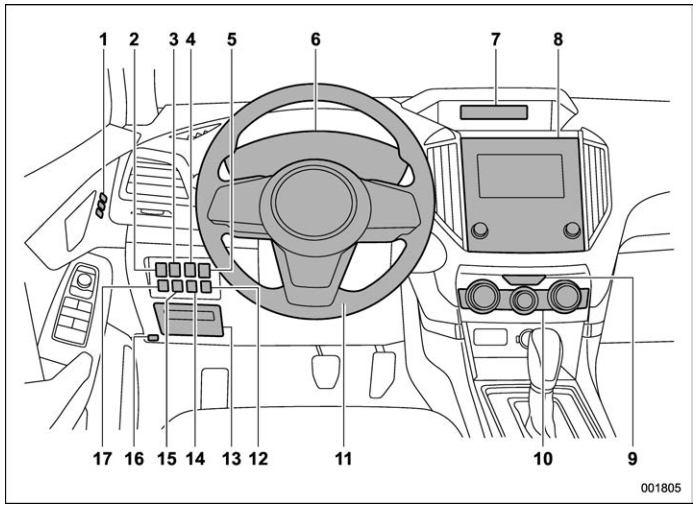
- Seat position memory switch
- Power rear gate button
- Steering Responsive Headlight OFF switch
- Memory switch
- Illumination brightness control dial
- Combination meter
- Type A multi-function display (black and white) (page 202)/Type B multi-function display (color LCD)
- Audio*
- Hazard warning flasher switch
- Climate control panel
- Tilt/Telescopic steering wheel
- Driver Monitoring System OFF switch
- Fuse box
- BSD/RCTA OFF switch (page 362)
- Auto Start Stop OFF switch
- Hood release knob
- Vehicle Dynamics Control OFF switch
*: For details about how to use the audio and navigation system (if equipped), refer to the separate navigation/audio Owner’s Manual.
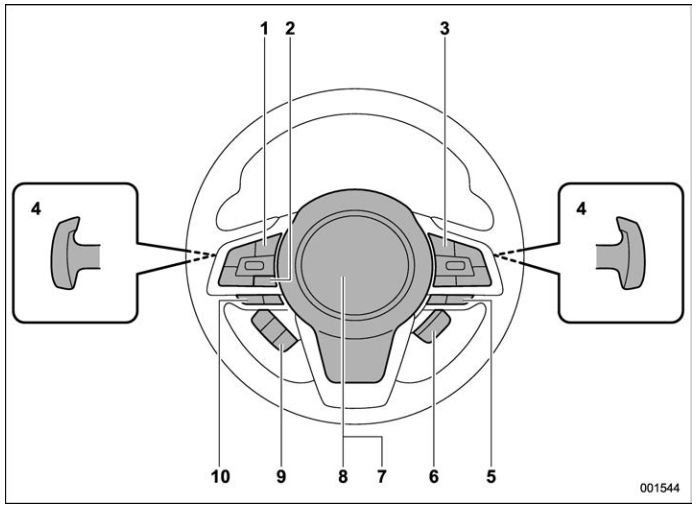
- Audio control switches*
- INFO button for type A multi-function display (black and white) / INFO button for type B multi-function display (color LCD)
- Cruise control switches
- Shift paddles
- SI-DRIVE switches
- Heated Steering Wheel switch
- SRS airbag
- Horn
- Combination meter display control switches
- Talk switch for voice command system* / Hands-free phone switches*
*: For details about how to use the switches, refer to the separate navigation/audio Owner’s Manual.
NOTE
For models with EyeSight system: Refer to the Owner’s Manual supplement for the EyeSight system.
 Interior
P..
 Light control and wiper control levers/switches
Windshield wiper
Mist
Windshield washer
Rear window wiper and washer switch
Wiper intermittent time control switch
Windshield wiper and washer switches
Light control switch
Fog light switch
Headlight ON/OFF/AUTO
Headlight flasher High/Low beam change
Turn signal lever
..
Other information:
Subaru Forester 2019-2026 Owners Manual: On-road and off-road driving
WARNING In a rollover crash, an unbelted person is significantly more likely to die than a person wearing a seatbelt. You the driver and all your passengers should fasten the seatbelts before starting to drive in order to minimize the chance of serious injury or death...
Subaru Forester 2019-2026 Owners Manual: Continuously variable transmission
WARNING Do not shift from the “P” or “N” position into the “D” or “R” position while depressing the accelerator pedal. This may cause the vehicle to jump forward or backward. CAUTION Observe the following precautions. Otherwise, the transmission could be damaged...
Categories
- Manuals Home
- Daytime running light system
- Low fuel warning light
- Instrument panel
- New on site
- Most important about car
Windshield wiper and washer switches
The wiper operates only when the ignition switch is in the “ON” or “ACC” position.

Copyright © 2026 www.suforester5.com