
Subaru Forester: Remote keyless entry system / Locking and Unlocking the doors
Locking the doors
Press the lock/arm button to lock all doors, the rear gate and fuel filler lid. An electronic chirp will sound once and the hazard warning flashers will flash once.
If any of the doors (or the rear gate) are not fully closed, the following will occur to alert you that the doors (or the rear gate) are not properly closed.
- An electronic chirp sounds five times.
- The hazard warning flashers flash five times.
When you close the door, it will automatically lock and then the following will occur.
- An electronic chirp sounds once.
- The hazard warning flashers flash once.
Unlocking the doors
Press the unlock/disarm button to unlock the driver’s door and fuel filler lid. An electronic chirp will sound twice and the hazard warning flashers will flash twice. To unlock all doors and the rear gate, briefly press the unlock/disarm button a second time within 5 seconds.
NOTE
If the interval between the first and second presses of the unlock/disarm button (for unlocking of all of the doors and the rear gate) is extremely short, the system may not respond.
Unlocking the rear gate
Press the rear gate unlock button to unlock the rear gate.
An electronic chirp will sound twice and the hazard warning flashers will flash twice.
 Remote keyless entry system
CAUTION
Do not expose the remote transmitter
to severe shocks, s..
 Vehicle finder function. Sounding a panic alarm
Vehicle finder function
Use this function to find your vehicle
parked among many vehicles in a large
parking lot. Provided you are within 30 feet
(10 meters) of the vehicle, pressing the
lock/arm button three times in a 5-second
period will cause your vehicle’s horn to
sound once and its haz..
Other information:
Subaru Forester 2019-2026 Owners Manual: Windshield washer fluid
Use windshield washer fluid. If windshield washer fluid is unavailable, use clean water. In areas where water freezes in winter, use an anti-freeze type windshield washer fluid. If you fill the reservoir tank with a fluid with a different concentration from the one used previously, purge the old fluid from the piping between the reservoir tank and washer nozzles by operating the washer for a certain period of time...
Subaru Forester 2019-2026 Owners Manual: Bypass screen setting
Select “Bypass Screen” from the 2nd menu in the setting screen. Refer to “Setting screen”. Select “On” or “Off” to turn the display of items on or off by using the control switches. Select “Set” to exit settings. Select “Go Back” to return to the previous screen without applying the setting changes...
Categories
- Manuals Home
- To activate/deactivate the X-MODE
- Auto Start Stop warning light/Auto Start Stop OFF indicator light (yellow)
- Low fuel warning light
- New on site
- Most important about car
Type B multi-function display (color LCD)
Turn the ignition switch to “ON”.
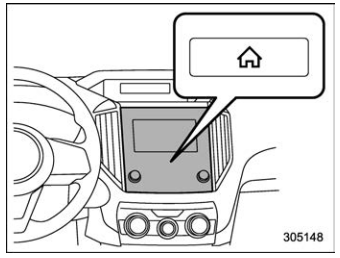
 button.
Select “Settings”.
Select “Vehicle”.
Select “Time/Date” and then select “Manual”.
button.
Select “Settings”.
Select “Vehicle”.
Select “Time/Date” and then select “Manual”.
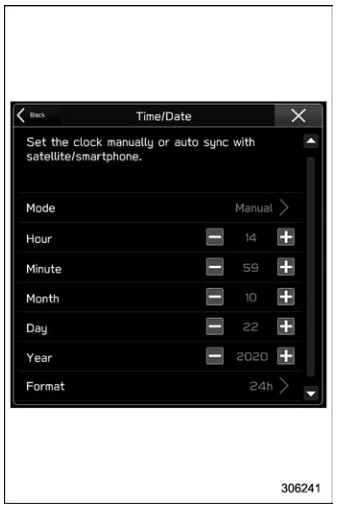
 to complete the
clock
setting.
to complete the
clock
setting.
