
Subaru Forester: Door locks / Rear occupant alert (ROA) system
The Rear Occupant Alert (ROA) system is designed to help reduce the possibility of unintentionally leaving a passenger or belongings in the rear seating area of your Kia Telluride.
For accurate operation, make sure all windows are completely closed while the ROA system is active. Air movement caused by open windows, insects, or blowing leaves may trigger unnecessary alerts.
1st alert
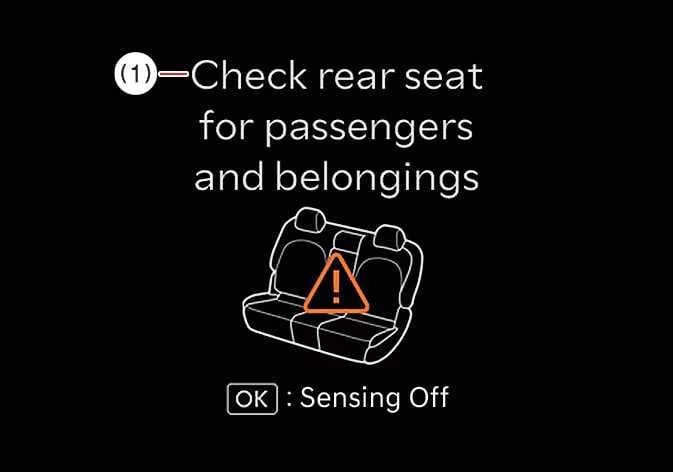
If a rear door has been opened and closed before the engine is turned off, a "Check rear seats" message appears on the instrument cluster when the driver's front door is opened after parking.
2nd alert
-
After the first alert has occurred, the system monitors the rear seating area. If movement is detected after the driver's door has been closed and all doors have been locked, the horn sounds for approximately 25 seconds. If movement continues, the alert may repeat up to eight times.
-
The movement detection function remains active for up to 24 hours after the vehicle has been locked.
-
Unlock the vehicle with the smart key to stop the alert.
The second-stage alert is available only if the first-stage reminder has been triggered beforehand.
Operation
You can enable or disable the Rear Occupant Alert system through the infotainment system:
-
Select the SETUP button on the infotainment display.
-
Select Settings > Vehicle >Convenience >Rear Occupant Alert.
NOTE
For the best detection performance, keep every window fully closed. Wind, insects, or other external movement entering through an open window may activate the sensor unexpectedly.
|
|
-
If you do not want the second-stage alert to operate for the current trip, press the OK button on the steering wheel while the first reminder is displayed.
-
Large boxes, luggage, or stacked cargo may interfere with movement detection. Likewise, falling objects may unintentionally trigger an alert.
-
The sensor may not perform correctly if its surface is covered by dust or other foreign materials.
-
Movement detected in the front seating area may occasionally activate the system.
-
Strong external vibrations, including those from automatic car washes or nearby heavy equipment, may trigger the alert while the vehicle is locked.
-
When the engine is started remotely, interior movement detection is temporarily suspended.
WARNING
Even when your Kia Telluride is equipped with the Rear Occupant Alert system, always check the rear seats before leaving the vehicle.
The alert may not operate correctly under the following conditions:
-
Movement is minimal or lasts only briefly.
-
A child is seated directly on the vehicle seat without an appropriate child restraint.
-
A passenger is covered by a blanket or another object that blocks movement detection.
-
Environmental conditions or surrounding interference prevent the sensor from detecting movement accurately.
-
The passenger seat or child restraint has been moved away from the detection area during seat adjustment.
CAUTION
If the vehicle's electrical system is damaged or loses power, the door lock system may not operate normally. Teach child passengers how to open the doors manually in case of an emergency.
Declaration of conformity. The radio frequency components (ROA Radar Sensor) complies:
For United States
For Canada
 In case of an emergency
If the electrical door lock system becomes inoperative, such as when..
 Digital Key 2 : (if equipped)
Kia Digital Key 2 adds another level of convenience to your Kia Telluride by allowing you to lock or unlock the doors and liftgate, as well as start the vehicle, using a compatible smartphone or card key without carrying the traditional smart key...
Other information:
Subaru Forester 2019-2026 Owners Manual: Fastening the seatbelt. Rear center seatbelt
Center seatbelt tongue plate Anchor tongue plate Anchor buckle Center seatbelt buckle WARNING Fastening the seatbelt with the webbing twisted can increase the risk or severity of injury in an accident. When fastening the belt after it is pulled out from the retractor, especially when inserting the anchor tongue plate into the mating buckle (on right-hand side), always check that the webbing is not twisted...
Subaru Forester 2019-2026 Owners Manual: Certification for immobilizer system
For models with “keyless access with push-button start system”:Refer to “Certification for keyless access with push-button start system”. For models without “keyless access with push-button start system”: U.S.-spec. modelsFCC ID: Y8PFJ16-2 CAUTION FCC WARNING Changes or modifications not expressly approved by the party responsible for compliance could void the user’s authority to operate the equipment...
Categories
- Manuals Home
- Automatic door locking/unlocking
- All-Wheel Drive warning light
- Auto Start Stop warning light/Auto Start Stop OFF indicator light (yellow)
- New on site
- Most important about car
Type B multi-function display (color LCD)
Turn the ignition switch to “ON”.
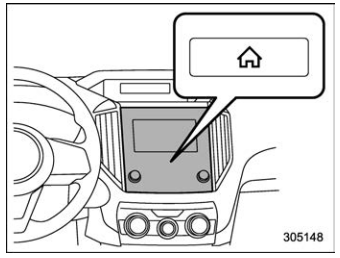
 button.
Select “Settings”.
Select “Vehicle”.
Select “Time/Date” and then select “Manual”.
button.
Select “Settings”.
Select “Vehicle”.
Select “Time/Date” and then select “Manual”.
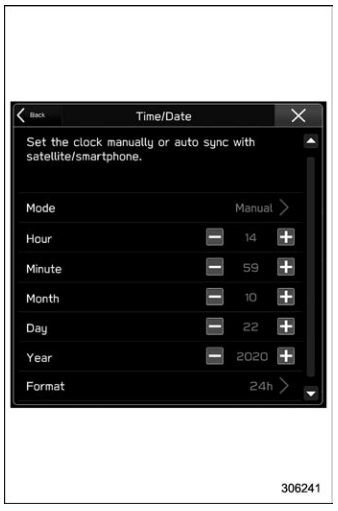
 to complete the
clock
setting.
to complete the
clock
setting.
