
Kia Telluride (LQ2, 2027-2026) Owner's Manual / Opening and closing
Subaru Forester: Opening and closing
- Keys
- Immobilizer system
- Theft-alarm system
- Door locks
- With the smart key
- With the mechanical key
- Operating door locks from inside the vehicle
- Door lock/unlock features : (if equipped)
- Electronic child safety lock system
- In case of an emergency
- Rear occupant alert (ROA) system
- Digital Key 2 : (if equipped)
- Digital Key 2 (smartphone)
- Digital key 2 (card key)
- Personalized profile and vehicle settings
- Digital Key 2 maintenance for a used vehicle
- Limitations of the system
- Liftgate
- Power liftgate: (if equipped)
- Operating the power liftgate
- Setting the power liftgate
- Resetting the power liftgate
- Emergency liftgate safety release
- Power liftgate automatic close
- Smart liftgate with auto open: (if equipped)
- Windows
- Hood
- Sunroof : (if equipped)
- Dual wide sunroof: (if equipped)
- Fuel filler door
 Opening and closing
Keys
The Kia Telluride smart key combines a traditional mechanical ..
 Keys
Keys
The Kia Telluride smart key combines a traditional mechanical key with a variety of convenient remote-control functions, allowing secure vehicle access and operation without removing the key from your pocket or bag under normal conditions...
Other information:
Subaru Forester 2019-2026 Owners Manual: Roof tent (models with roof rails)
WARNING Adding weight to the vehicle’s roof can adversely affect handling, braking, and rollover resistance. The vehicle must never be driven with a total roof rail load in excess of 176 lbs (80 kg). CAUTION The roof rail load limit for stationary vehicles (700 lbs (317 kg)) applies only when the vehicle is parked and the load is evenly distributed left/right and front/ rear and the roof crossbars and roof tent are tightly secured to the vehicle...
Subaru Forester 2019-2026 Owners Manual: Gross Vehicle Weight (GVW) and Gross Vehicle Weight Rating (GVWR)
Gross Vehicle Weight The Gross Vehicle Weight (GVW) must never exceed the Gross Vehicle Weight Rating (GVWR). Gross Vehicle Weight (GVW) is the combined total of the weight of the vehicle, driver, passengers, luggage, trailer hitch, trailer tongue load and any other optional equipment installed on your vehicle...
Categories
- Manuals Home
- Reclining the seatback (if equipped)
- Vehicle load limit – how to determine
- Changing a flat tire
- New on site
- Most important about car
Type B multi-function display (color LCD)
Turn the ignition switch to “ON”.
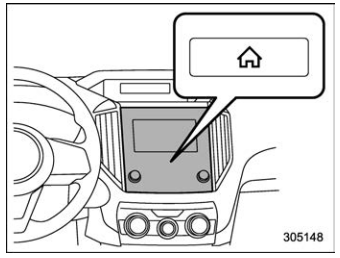
 button.
Select “Settings”.
Select “Vehicle”.
Select “Time/Date” and then select “Manual”.
button.
Select “Settings”.
Select “Vehicle”.
Select “Time/Date” and then select “Manual”.
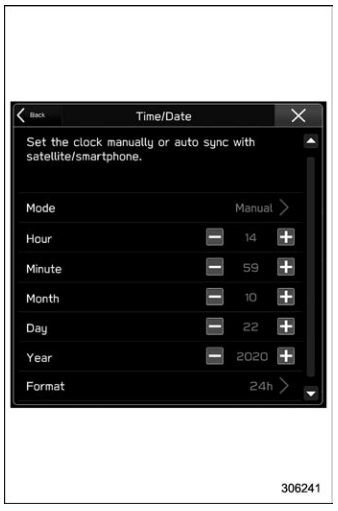
 to complete the
clock
setting.
to complete the
clock
setting.

Copyright © 2026 www.suforester5.com