
Subaru Forester 2019-2026 Owners Manual / Driving tips / Trailer towing / Connecting a trailer / Side mirrors
Subaru Forester: Connecting a trailer / Side mirrors
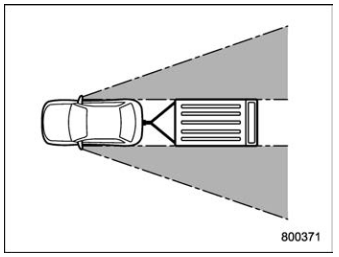
After hitching a trailer to your vehicle, check that the standard side mirrors provide a good rearward field of view without significant blind spots. If significant blind spots occur with the vehicle’s standard side mirrors, use towing mirrors that conform with Federal, state/province and/ or other applicable regulations.

 Trailer lights
CAUTION
Direct splicing or other improper
connection of trailer lights may
damage your vehicle’s electrical
system and cause a malfunction of
your vehicle’s lighting system...
Other information:
Subaru Forester 2019-2026 Owners Manual: To operate the Auto Vehicle Hold function
Stop the vehicle by depressing the brake pedal when all of the following conditions are met. Then the Auto Vehicle Hold function will operate. Driver’s door is closed. The driver’s seatbelt is fastened. The select lever is in a position other than the “P” position...
Kia Telluride (LQ2, 2027-2026) Owner's Manual: Safe Exit Assist malfunction and limitations
Safe Exit Assist malfunction Check Driver Assistance system message displayed on the Kia Telluride cluster When the Safe Exit Assist system in your Kia Telluride encounters a disruption and is not working properly, the master warning light () will illuminate on the instrument cluster...
Categories
- Manuals Home
- All-Wheel Drive warning light
- If the passenger’s frontal airbag OFF indicator illuminates and the ON indicator turns off even when the front passenger’s seat is occupied by an adult
- Disabling functions
- New on site
- Most important about car
Driving information display
NOTE
You can set the units for both the multifunction display (black and white) and the combination meter at the same time. For details about setting the language and units, refer to “Type A combination meter” or “Menu screens”.

Copyright © 2026 www.suforester5.com