
Subaru Forester: Instruments and controls / Steering Responsive Headlight (SRH)
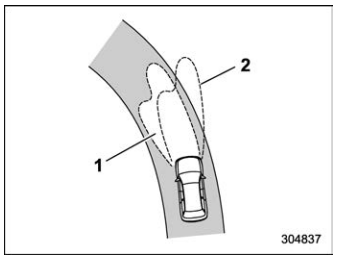
- The target area of illumination when SRH is activated.
- The target area of illumination when SRH is not activated.
SRH is a function that automatically moves the headlight beam to the left or right in accordance with the steering angle and vehicle speed. This function helps to improve the visibility at night by illuminating the road ahead at corners and intersections.
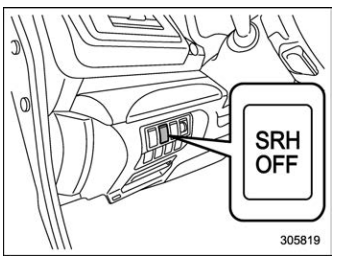
You can turn the SRH function on or off by pressing the SRH OFF switch.
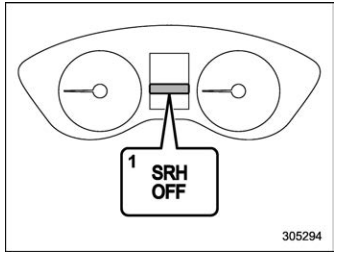
- SRH OFF indicator light
The SRH OFF indicator light on the combination meter turns off when SRH is turned on.
The SRH OFF indicator light on the combination meter illuminates when SRH is turned off.
If SRH is malfunctioning, the SRH OFF indicator light on the combination meter flashes when the ignition switch is in the “ON” position. It indicates that SRH has been deactivated. Contact a SUBARU dealer for an inspection.
NOTE
- If you turn the ignition switch to the “OFF” position with SRH turned off and then start the engine again, SRH will automatically turn on.
- When you turn the ignition switch to the “ON” position, the SRH OFF indicator light will illuminate and turn off after several seconds.
- SRH only activates when the vehicle is traveling forward at the speed of approximately 5 mph (8 km/h) or more.

 Headlight beam leveler
The LED headlights produce more light
than conventional halogen headlights.
When the vehicle is carrying a heavy load
and the headlight beams are angled
upwards, the driver of an oncoming vehicle
may experience glare...
Other information:
Kia Telluride (LQ2, 2027-2026) Owner's Manual: Folding the Outside Rearview Mirrors
Manual folding mirrors On select Kia Telluride models, the outside rearview mirrors can be folded manually. Simply grasp the mirror housing firmly and gently pivot it toward the rear of the vehicle to tuck it against the body. Electric folding mirrors For models equipped with power-folding mirrors, you can easily fold or unfold the outside rearview mirrors by pressing the dedicated control button, as illustrated below: To fold your Kia Telluride mirrors, simply press the folding switch button...
Subaru Forester 2019-2026 Owners Manual: Programming a New HomeLink Button
Indicator Light HomeLink Buttons Press and release the HomeLink button that you would like to program. The HomeLink indicator light will flash orange slowly (if not, refer to “Erasing HomeLink Buttons”). Garage door opener remote Position the hand-held remote (garage door opener remote) 1 to 3 inches (2 to 8 cm) away from the HomeLink button that you would like to program...
Categories
- Manuals Home
- RAB warning light (if equipped)
- Power steering warning light
- If the passenger’s frontal airbag OFF indicator illuminates and the ON indicator turns off even when the front passenger’s seat is occupied by an adult
- New on site
- Most important about car
Outside temperature indicator
The outside temperature is displayed on the multi-function display (color LCD).
NOTE
The outside temperature indicator shows the temperature around the sensor. However, the temperature may not be indicated correctly or the update may be delayed in the following conditions. While parking or driving at low speeds When the outside temperature changes suddenly (example: when going in and out of an underground parking area or when passing through a tunnel) When starting the engine after being parked for a certain period of time The temperature unit cannot be changed.