
Subaru Forester: To temporarily cancel and turn off the cruise control / To temporarily cancel the cruise control
The cruise control can be temporarily canceled in the following ways.
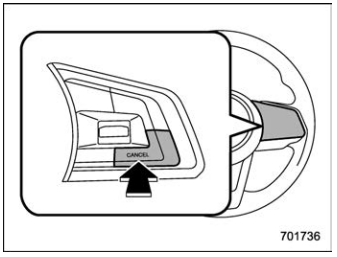
- Press the “CANCEL” button.
- Press the X-MODE switch to activate the X-MODE.
- Depress the brake pedal.
WARNING
You can cancel the cruise control by shifting the select lever into the “N” position. However, do not shift the lever into the “N” position while driving except in case of emergency. If the select lever is shifted into the “N” position, the engine brake will no longer work. This could result in an accident.
The cruise control set indicator light in the combination meter turns off when the cruise control is canceled.
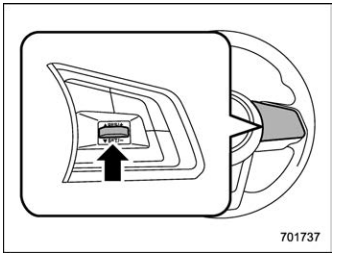
To resume the cruise control after it has been temporarily canceled and with vehicle speed of approximately 20 mph (30 km/h) or more, press the “RES/SET” switch to the “RES” side to return to the original cruising speed automatically. The cruise control set indicator light in the combination meter will automatically illuminate at this time.

 To turn off the cruise control
There are two ways to turn off the cruise
control:
Press the cruise control main button
again.
Turn the ignition switch to the “ACC” or
“LOCK”/“OFF” position (but only when the
vehicle is completely stopped)...
Other information:
Subaru Forester 2019-2026 Owners Manual: On-road and off-road driving
WARNING In a rollover crash, an unbelted person is significantly more likely to die than a person wearing a seatbelt. You the driver and all your passengers should fasten the seatbelts before starting to drive in order to minimize the chance of serious injury or death...
Subaru Forester 2019-2026 Owners Manual: After deployment
After the deployment, the SRS side airbag immediately starts to deflate. The time required from detection of an impact to deflation of an SRS side airbag after deployment is shorter than the blink of an eye. The SRS curtain airbag remains inflated for a while following deployment then slowly deflates...
Categories
- Manuals Home
- Changing a flat tire
- All-Wheel Drive warning light
- Vehicle load limit – how to determine
- New on site
- Most important about car
Warning screen
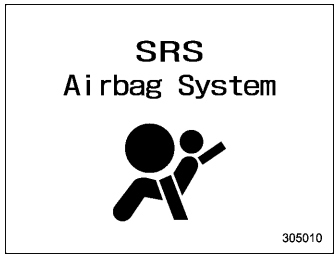
Example of warning
If there is a warning message or a maintenance notification, it will appear on this screen. Take the appropriate actions based on the messages indicated.
