
Subaru Forester: Combination meter display (color LCD) (if equipped) / Warning screen
Example of warning
If there is a warning message or a maintenance notification, it will appear on this screen. Take the appropriate actions based on the messages indicated.
 Welcome screen (opening animation) and Good-bye (ending animation) screen
When the driver’s door is opened and
closed after unlocking the d..
 Telltale screen
Telltale screen
When the corresponding situation occurs,
the following telltales will be displayed on
the telltale screen.
NOTE
When there is warning information to
display, it will be displayed in five
warning indicators, starting on the left
in ascending order of severity...
Other information:
Kia Telluride (LQ2, 2027-2026) Owner's Manual: Rear occupant alert (ROA) system
The Rear Occupant Alert (ROA) system is designed to help reduce the possibility of unintentionally leaving a passenger or belongings in the rear seating area of your Kia Telluride. For accurate operation, make sure all windows are completely closed while the ROA system is active...
Subaru Forester 2019-2026 Owners Manual: Battery
WARNING Before beginning work on or near any battery, be sure to extinguish all cigarettes, matches, and lighters. Never expose a battery to an open flame or electric sparks. Batteries give off a gas which is highly flammable and explosive...
Categories
- Manuals Home
- Reverse Automatic Braking (RAB) system ON/OFF setting
- How to use the high beam assist function
- RAB warning light (if equipped)
- New on site
- Most important about car
Type B multi-function display (color LCD)
Turn the ignition switch to “ON”.
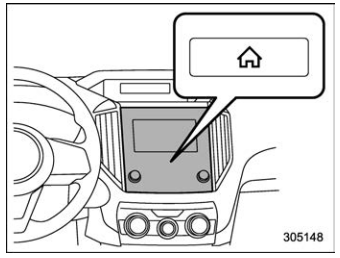
 button.
Select “Settings”.
Select “Vehicle”.
Select “Time/Date” and then select “Manual”.
button.
Select “Settings”.
Select “Vehicle”.
Select “Time/Date” and then select “Manual”.
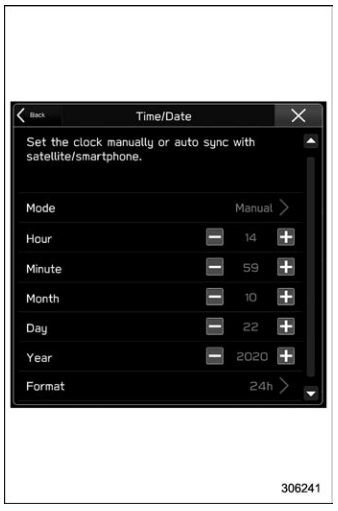
 to complete the
clock
setting.
to complete the
clock
setting.

Copyright © 2026 www.suforester5.com