
Subaru Forester 2019-2026 Owners Manual / Instruments and controls / Fog light switch (if equipped)
Subaru Forester: Instruments and controls / Fog light switch (if equipped)
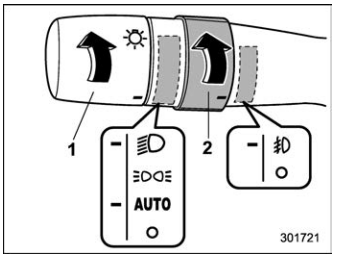
Headlight switch
Fog light switch
The front fog lights will turn on when the
fog light switch is placed in the  position
while the headlights are in the following
condition.
position
while the headlights are in the following
condition.
- The headlight switch is in the
 position with the low
beam mode selected.
position with the low
beam mode selected. - For models with the auto on/off headlights, while the headlight switch is in the “AUTO” position and the low beam headlights turn on automatically.
To turn off the front fog lights, turn the
switch back down to the  position.
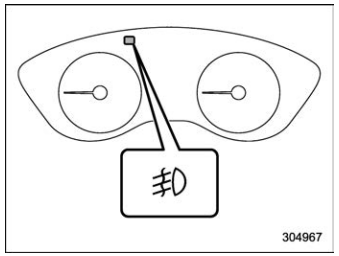
The indicator light on the combination meter will illuminate when the front fog lights are illuminated.

 Turn signal lever
Right turn
Lane change right signal
Lane change left signal
Left turn
If the lever does not return after cornering,
return the lever to the neutral position by
hand...
Other information:
Subaru Forester 2019-2026 Owners Manual: Folding down the rear seatback
WARNING When you fold down the seatback, check that there are no passengers or objects on the rear seat. Not doing so creates a risk of injury or property damage if the seatback suddenly folds down. Never allow passengers to ride on the folded rear seatback or in the cargo area...
Kia Telluride (LQ2, 2027-2026) Owner's Manual: Owner maintenance. Owner maintenance schedule
The following owner maintenance schedules outline essential visual inspections, fluid checks, and mechanical verifications that should be carried out by the driver or an authorized Kia dealer at designated intervals to maintain the safe, efficient, and dependable operation of your Kia Telluride...
Categories
- Manuals Home
- Unlock using PIN Code Access
- Power steering warning light
- All-Wheel Drive warning light
- New on site
- Most important about car
Driving information display
NOTE
You can set the units for both the multifunction display (black and white) and the combination meter at the same time. For details about setting the language and units, refer to “Type A combination meter” or “Menu screens”.

Copyright © 2026 www.suforester5.com