
Subaru Forester: Forward Collision-avoidance Assist (FCA) (Sensor Fusion) / Forward Collision-avoidance Assist settings
Forward Safety
|
|
While the vehicle is ON, tap Setup > Vehicle > Driver Assistance > Driving Safety on the infotainment system screen to review or change the Forward Collision-Avoidance Assist settings in the Kia Telluride.
Forward Safety allows collision warnings or emergency braking to operate when the system detects an imminent risk of a forward collision. If this setting is deselected, Forward Safety will turn off and the Forward Safety warning light ( ) will appear on the instrument cluster.
Forward Cross-Traffic Safety: (if equipped)
|
|
|
While the vehicle is ON, tap Setup > Vehicle > Driver Assistance > Driving Safety > Forward Cross-Traffic Safety on the infotainment system screen to adjust the Junction Crossing function settings when this feature is equipped.
Forward/Side Safety: (if equipped)
|
|
While the vehicle is ON, tap Setup > Vehicle > Driver Assistance > Driving Safety > Forward/Side Safety on the infotainment system screen to change the Forward/Side Safety settings.
Forward/Side Safety allows collision warnings or emergency steering assistance to support the driver when a collision appears imminent. If this setting is deselected, Forward Safety will turn off and the Emergency steering warning light ( ) will appear on the cluster.
You can monitor the Forward Collision-Avoidance Assist setting status through the Settings menu on the infotainment system screen. If the Forward Safety warning light (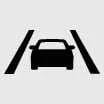 ) or Emergency steering warning light (
 ) remains ON while Forward Safety or Forward/Side Safety is selected, have the Kia Telluride inspected by an authorized Kia dealer.
TIP
Even when Forward Safety is turned ON, the driver must stay alert, keep both attention and control on the road, and be ready to brake or steer at any time. If Forward Safety is turned OFF, the system cannot provide its normal assistance.
Automatic Activation
Forward Collision-Avoidance Assist (FCA) is automatically activated under the following driving convenience conditions:
-
When both Lane Following Assist (LFA) and Smart Cruise Control (SCC) are turned on
-
When Highway Driving Assist (HDA) is turned on: (if equipped)
When Forward Collision-Avoidance Assist (FCA) is automatically activated under these conditions and you attempt to turn it off, a warning message will appear and the system will remain active rather than being deactivated.
CAUTION
-
If you turn the engine off and then restart it, Forward Collision-Avoidance Assist will be activated automatically. Each function can be turned off from the settings menu while the vehicle is stopped, but any disabled feature will no longer provide assistance. Always drive the Kia Telluride with caution and do not rely only on driver assistance systems.
-
Steering wheel vibration can be turned ON or OFF according to driver preference.
-
Forward Safety settings include the “Basic,” “Junction Turning,” and “Direct Oncoming” functions. Forward Cross-Traffic Safety includes the “Junction Crossing” function. Forward/Side Safety includes the “Lane Change Oncoming,” “Lane Change Side,” and “Evasive Steering Assist” functions: (if equipped)
-
If Forward Safety is set to OFF, the “Junction Crossing” function will not operate even when Forward Cross-Traffic Safety and Forward/Side Safety are selected: (if equipped)
-
When towing a trailer or installing a carrier, vehicle stability may be reduced. Disable the function if necessary and continue driving with extra care.
-
Do not use the system when towing another vehicle or when installing equipment that may interfere with sensor performance or affect vehicle balance. Under these conditions, the system may not operate as intended.
-
Forward Cross-Traffic Safety and Forward/Side Safety functions, when equipped, may not operate properly when a trailer, carrier, or other equipment is installed, or when another vehicle is being towed. Do not use these functions in such conditions.
-
When connecting a trailer or carrier, set the trailer or carrier menu if equipped. If the driver sets the menu manually, or if the trailer or carrier connection is automatically recognized through genuine parts, some driver assistance functions may be limited. Refer to Driver assistance system limitations and always drive with caution.
-
When Forward Collision-Avoidance Assist (FCA) is automatically activated, it will remain on even if the related driving convenience features are turned off. To turn off Forward Collision-Avoidance Assist (FCA), stop the vehicle, turn off the driving convenience features, and then attempt to deactivate the system.
Forward Safety Warning Timing
|
|
|
While the vehicle is ON, tap Setup > Vehicle > Driver Assistance > Driving Safety > Forward Safety Warning Timing on the infotainment system screen to adjust how early Forward Collision-Avoidance Assist provides its warning in the Kia Telluride.
-
Use Standard for everyday driving and typical road conditions. If the warning feels too sensitive or activates earlier than expected, change the setting to Late.
-
If Late is selected, Forward Collision-Avoidance Assist will warn the driver later than it does with the Standard timing.
TIP
-
Even with Standard Warning Timing selected, the warning may still feel delayed if the vehicle ahead stops suddenly or the situation changes very quickly.
-
Select Late Warning Timing mainly when driving at low speeds in light traffic, where earlier alerts may feel overly sensitive.
TIP
The warning timing setting is stored by the system and will not reset automatically when the Kia Telluride is restarted.
Warning Methods
|
|
|
To change the Warning Methods settings while the vehicle is ON, tap Setup > Vehicle > Driver Assistance > Warning Methods on the infotainment system screen. These settings control how the Kia Telluride presents alerts from supported driver assistance systems:
-
Warning Volume: Adjusts the loudness of the warning sound so alerts can be heard clearly without being unnecessarily intrusive.
-
Haptic Warning: Turns the steering wheel vibration warning ON to provide a physical alert in addition to visual and audible warnings.
-
Driving Safety Priority: Temporarily lowers all other audio volumes when the Driving Safety system issues a warning, helping the driver notice the alert more quickly.
TIP
-
Your Warning Methods settings may also apply to warning methods used by other driver assistance systems in the vehicle.
-
Warning Methods keep their most recent settings after the vehicle is turned OFF and restarted.
-
The Warning Methods setting menu may not be available on every Kia Telluride, depending on vehicle equipment and configuration.


Other information:
Subaru Forester 2019-2026 Owners Manual: If the fuel filler lid cannot be opened
If the fuel filler lid cannot be opened due to malfunction or a dead battery, it can be opened from the cargo area. Remove the access cover at the rightside of the cargo area trim using flat-head screwdriver. Clip Remove the orange knob from the clip...
Kia Telluride (LQ2, 2027-2026) Owner's Manual: Side curtain: (if equipped)
To operate the side window curtain in your Kia Telluride, follow these steps: Gently lift the curtain by using the integrated knob (1)...
Categories
- Manuals Home
- Automatic door locking/unlocking
- If the passenger’s frontal airbag OFF indicator illuminates and the ON indicator turns off even when the front passenger’s seat is occupied by an adult
- Replacing battery of access key fob
- New on site
- Most important about car
Driving information display
NOTE
You can set the units for both the multifunction display (black and white) and the combination meter at the same time. For details about setting the language and units, refer to “Type A combination meter” or “Menu screens”.
