
Subaru Forester: Driver assistance guide
WARNING
As the driver, never rely solely on the Driver Assistance Systems in the Kia Telluride. These technologies are designed to support attentive driving, not replace it. They operate with the expectation that the driver remains in control of the vehicle at all times and are intended to help reduce collision impact or assist during normal driving situations. Each system has recognition limits and performance limitations, which are explained throughout this manual. You are fully responsible for monitoring the road, surrounding traffic, pedestrians, and driving conditions. Always keep your attention on driving and be prepared to brake, steer, or take other corrective action to avoid a collision. The Kia Telluride is not an autonomous or self-driving vehicle. Failure to drive with proper care may result in injury, death, or vehicle damage.
TIP
Because infotainment system software may be updated after the owner's manual is published, descriptions or menu names for certain driver assistance features may differ from what appears in this manual. If this occurs, scan the QR code in the infotainment system quick guide to access the web manual and confirm the latest operating information.
- Overview. Detecting sensor(s)
- Forward Collision-avoidance Assist (FCA) (Sensor Fusion)
- Forward Collision-avoidance Assist settings
- Forward Collision-avoidance Assist operation
- Forward Collision-avoidance Assist malfunction and limitations
- Lane Keeping Assist (LKA)
- Lane Keeping Assist settings
- Lane Keeping Assist operation
- Lane Keeping Assist malfunction and limitations
- Lane Following Assist (LFA)
- Blind-spot Collision-avoidance Assist (BCA)
- Blind-Spot Collision-avoidance Assist settings
- Blind-Spot Collision-avoidance Assist malfunction and limitations
- Safe Exit Assist (SEA)
- Safe Exit Assist settings
- Safe Exit Assist operation. Warning and control
- Safe Exit Assist malfunction and limitations
- Blind-spot View Monitor (BVM): (if equipped)
- Manual Speed Limit Assist (MSLA). Manual Speed Limit Assist operation
- Intelligent Speed Limit Assist (ISLA): (if equipped)
- Intelligent Speed Limit Assist settings. Speed Limit
- Intelligent Speed Limit Assist operation. Warning and control
- Intelligent Speed Limit Assist malfunction and limitations
- Driver Attention Warning (DAW)
- Driver Attention Warning settings
- Driver Attention Warning operation
- Driver Attention Warning malfunction and limitations
- Forward Attention Warning (FAW): (if equipped)
- Forward Attention Warning settings: (if equipped). Forward attention warning
- Forward Attention Warning operation
- Forward Attention Warning malfunction and limitations
- Smart Cruise Control (SCC)
- Smart Cruise Control settings
- Smart Cruise Control operation
- Smart Cruise Control malfunction and limitations
- Emergency Stop (ES)
- Navigation-based Smart Cruise Control (NSCC): (if equipped)
- Navigation-based Smart Cruise Control settings. Auto Highway Speed Change
- Navigation-based Smart Cruise Control operation
- Navigation-based Smart Cruise Control limitations
- This device complies with Part 15 of the FCC rules.
- Highway Driving Assist (HDA): (if equipped)
- Highway Driving Assist settings
- Highway Driving Assist operation
- Highway Driving Assist malfunction and limitations
- This device complies with Part 15 of the FCC rules.
- Rear View Monitor (RVM): (if equipped)
- Surround View Monitor (SVM): (if equipped)
- Surround View Monitor settings
- Surround View Monitor operation
- Surround View Monitor malfunction and limitations
- Rear Cross-traffic Collision-avoidance Assist (RCCA)
- Rear Cross-Traffic Collision-avoidance Assist settings
- Rear Cross-Traffic Collision-avoidance Assist operation
- Rear Cross-Traffic Collision-avoidance Assist malfunction and limitations
- Parking Distance Warning (PDW): (if equipped)
- Parking Distance Warning settings
- Parking Distance Warning operation
- Parking Distance Warning malfunction and precautions
- Reverse Parking Collision-avoidance Assist (PCA): (if equipped)
- Reverse Parking Collision-avoidance Assist settings
- Reverse Parking Collision-avoidance Assist operation
- Reverse Parking Collision-avoidance Assist malfunction and limitations
- Remote Smart Parking Assist (RSPA): (if equipped)
- Remote Smart Parking Assist settings. Warning methods
- Remote Smart Parking Assist operation
- Remote Smart Parking Assist malfunction and limitations
- Declaration of conformity
 Vehicle weight
T..
 Overview. Detecting sensor(s)
Detecting sensor(s)
Figure 1. Front view
Figure 2. Rear view
Refer to the illustrations above for the detailed locations of the detecting sensors used by the driver assistance systems...
Other information:
Subaru Forester 2019-2026 Owners Manual: Windshield wiper blade assembly
Raise the wiper arm off the windshield. CAUTION Hold the wiper arm when replacing the wiper blade. Holding the wiper blade, may result in blade deformation. Lock knob Hold the wiper blade connection by hand, push the lock knob to release the lock, and then pull out the wiper blade assembly...
Kia Telluride (LQ2, 2027-2026) Owner's Manual: Smart Cruise Control display and control
You can effortlessly monitor the operational status of the Smart Cruise Control (SCC) system by accessing the "Driving Assist" view located within your Kia Telluride instrument cluster. For a comprehensive overview of how to customize these views, please refer to the detailed LCD display mode settings in your owner’s manual...
Categories
- Manuals Home
- RAB warning light (if equipped)
- Low fuel warning light
- Unlock using PIN Code Access
- New on site
- Most important about car
Average vehicle speed
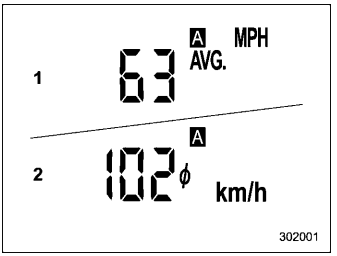
This display shows the average vehicle speed since the trip meter was last reset. Pressing the TRIP RESET switch toggles the display between the average vehicle speed corresponding to the A trip meter display and the average vehicle speed corresponding to the B trip meter display. When either of the trip meter displays is reset, the corresponding average vehicle speed value is also reset.
