
Subaru Forester: Navigation-based Smart Cruise Control (NSCC): (if equipped) / Navigation-based Smart Cruise Control settings. Auto Highway Speed Change
Auto Highway Speed Change

|
|
While the vehicle is ON, open Setup > Vehicle > Driver Assistance > Driving Convenience > Auto Highway Speed Change on the infotainment display to configure this feature.
TIP
If Navigation-based Smart Cruise Control detects a system fault, the Auto Highway Speed Change option cannot be enabled until the issue has been resolved.

 Navigation-based Smart Cruise Control operation
Operating conditions
Navigation-based Smart Cruise Control operates when all of the following conditions are satisfied:
Smart Cruise Control is currently active...
Other information:
Subaru Forester 2019-2026 Owners Manual: Conditions in which front passenger’s SRS frontal airbag is not activated
The front passenger’s SRS frontal airbag will not be activated when any of the following conditions are met regarding the front passenger’s seat: The seat is empty. The seat is equipped with an appropriate child restraint system and an infant or a child is restrained in it...
Kia Telluride (LQ2, 2027-2026) Owner's Manual: Windshield defrosting and defogging
Frost, condensation, or moisture on the windshield can significantly reduce visibility and should always be removed before driving the Kia Telluride. WARNING Windshield heating Do not use the or setting while operating the air conditioner (A/C) in extremely humid weather...
Categories
- Manuals Home
- Auto Start Stop warning light/Auto Start Stop OFF indicator light (yellow)
- Reverse Automatic Braking (RAB) system ON/OFF setting
- Disabling functions
- New on site
- Most important about car
Average vehicle speed
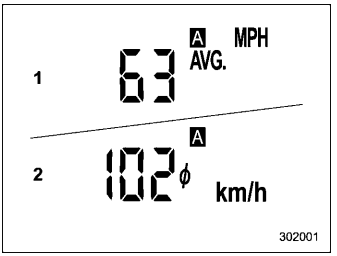
This display shows the average vehicle speed since the trip meter was last reset. Pressing the TRIP RESET switch toggles the display between the average vehicle speed corresponding to the A trip meter display and the average vehicle speed corresponding to the B trip meter display. When either of the trip meter displays is reset, the corresponding average vehicle speed value is also reset.
