
Subaru Forester: Controls and features / Windshield defrosting and defogging
Frost, condensation, or moisture on the windshield can significantly reduce visibility and should always be removed before driving the Kia Telluride.
WARNING
Windshield heating
Do not use the  or
or  setting while operating the air conditioner (A/C)
in extremely humid weather. A large temperature difference between the outside air and the windshield may cause
the outer surface of the glass to fog, reducing visibility and increasing the risk of an accident. In these
conditions, select
setting while operating the air conditioner (A/C)
in extremely humid weather. A large temperature difference between the outside air and the windshield may cause
the outer surface of the glass to fog, reducing visibility and increasing the risk of an accident. In these
conditions, select  mode and set the blower to its
lowest speed.
mode and set the blower to its
lowest speed.
-
For maximum defrosting performance, set the temperature control to the highest heat setting and adjust the fan speed to its maximum level.
-
Select the floor/defrost mode if you want warm air directed to the footwell while simultaneously defrosting or defogging the windshield.
-
Before driving your Kia Telluride, completely remove snow and ice from the windshield, rear window, outside mirrors, and all side windows.
-
For improved heater and defroster efficiency, remove any snow, ice, leaves, or debris from the hood area and the air intake grille at the base of the windshield.
Defogging the inside of the windshield
For automatic climate control system
To remove condensation from the inside of the windshield using the automatic climate control system, follow these steps:
-
Set the desired blower fan speed.
-
Select the preferred cabin temperature.
-
Press the windshield defroster icon
 .
. -
The system automatically switches to outside air intake, and the air conditioner (A/C) operates according to the detected outside temperature.
If outside air intake and the A/C system are not activated automatically, press the corresponding controls manually. If you choose the  mode, the climate control system automatically increases the fan speed for more effective defogging.
Defrosting the outside of the windshield
For automatic climate control system
To remove frost or ice from the outside of the windshield using the automatic climate control system, follow these steps:
-
Set the blower fan to its highest speed.
-
Adjust the temperature to the maximum heat setting.
-
Press the windshield defroster icon
 .
. -
The system automatically selects outside air intake, and the air conditioner (A/C) operates as required according to the detected ambient temperature.
AUTO defogging system
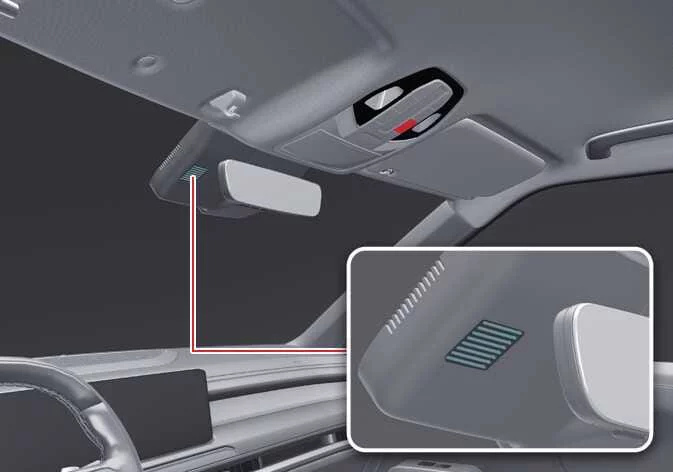
The AUTO Defogging System continuously monitors moisture on the inside surface of the windshield and automatically helps reduce windshield fogging to improve visibility while driving the Kia Telluride.
|
The AUTO Defogging System operates whenever the heating or air conditioning (A/C) system is running.
When the feature becomes active, the AUTO defogging indicator appears on the display.
If excessive humidity is detected inside the Kia Telluride cabin, the system automatically begins the defogging process.
The following actions are carried out automatically:
-
The A/C indicator illuminates.
-
The air intake control switches to outside air when the outside temperature is low.
-
The airflow mode changes to the windshield defrost position so air is directed toward the windshield.
-
The blower fan speed increases to help clear the glass more quickly.
NOTE
Do not remove or modify the sensor cover located at the upper portion of the windshield.
Damage to the sensor or related components may affect system performance and may not be covered by the vehicle warranty.
TIP
-
If you attempt to switch the A/C system OFF while AUTO Defogging is active, the indicator flashes three times and the A/C remains turned on.
-
To maintain the effectiveness of the AUTO Defogging System, avoid selecting the recirculated air mode while the system is operating.
-
While AUTO Defogging is active, manual adjustment of the fan speed control, temperature control, and air intake control is temporarily disabled until the system completes its operation.
Defroster
The Kia Telluride is equipped with a rear window defroster designed to quickly remove frost, condensation, and light ice, helping maintain clear rearward visibility in cold or humid weather.
For instructions on clearing the front windshield, refer to the section covering windshield defrosting and defogging.
NOTE
Conductors
The heating conductors are bonded to the inside surface of the rear window. To avoid damaging these delicate elements, never use sharp tools, scrapers, blades, or abrasive glass cleaners when cleaning the rear glass. Use only a soft cloth and a suitable non-abrasive glass cleaner.
Rear window defroster

|
When the vehicle is in the ON position, the rear window defroster heats the glass to remove frost, condensation, and thin layers of ice, improving visibility through the rear window during winter driving or damp weather conditions.
If a significant amount of snow has accumulated on the rear window, brush it away before activating the rear defroster. Removing excess snow allows the system to operate more efficiently and speeds up the clearing process.
To turn the rear window defroster on:
-
Press the rear window defroster icon located on the heater and climate control panel.
The indicator light on the rear window defroster icon illuminates to confirm that the system is operating.
For convenience, the Kia Telluride rear window defroster automatically switches off after approximately 20 minutes, or whenever the vehicle is placed in the OFF position.
To turn off the defroster:
-
Press the rear window defroster icon once again to deactivate the system manually.
Outside mirror defroster
If your Kia Telluride is equipped with heated outside mirrors, they will operate automatically whenever the rear window defroster is activated, helping remove frost and condensation from the mirror surfaces for improved side visibility.
Defogging logic: (if equipped)
To help reduce the likelihood of windshield fogging, the Kia Telluride automatically adjusts the air intake mode and A/C operation according to operating conditions. These automatic changes are reflected by indicators such as  or
or  .
.
Canceling or restoring automatic defogging logic for automatic climate control system
Select Settings > Vehicle > Climate > Auto Defog from the infotainment system screen.
If the 12V battery becomes discharged or is disconnected, the automatic defogging logic returns to its default settings and may need to be configured again through the infotainment system.
TIP
The infotainment system interface may change following software updates. If menu layouts or available options differ from those shown here, consult the infotainment owner's manual and the quick reference guide supplied with your Kia Telluride.
 Recirculate air: (if equipped)
This feature automatically switches the Kia Telluride climate contro..
 Storage compartments
The Kia Telluride provides several convenient storage compartments for keeping frequently used personal belongings organized and easily accessible for both the driver and passengers...
Other information:
Kia Telluride (LQ2, 2027-2026) Owner's Manual: Camera cleaning system
If the rear camera lens becomes dirty, the image shown on the display may appear unclear or blurred. Use the washer system to help clean the camera and restore better rear visibility. To spray washer fluid onto the rear camera, push the wiper lever toward the instrument cluster...
Subaru Forester 2019-2026 Owners Manual: Type A
Turn the airflow mode selection dial and fan speed control dial to the “AUTO” position. Set the preferred temperature using the temperature control dial. NOTE Each function can be individually set to the “AUTO” mode independently of the other functions...
Categories
- Manuals Home
- Daytime running light system
- Unlock using PIN Code Access
- If the passenger’s frontal airbag OFF indicator illuminates and the ON indicator turns off even when the front passenger’s seat is occupied by an adult
- New on site
- Most important about car
Type B multi-function display (color LCD)
Turn the ignition switch to “ON”.
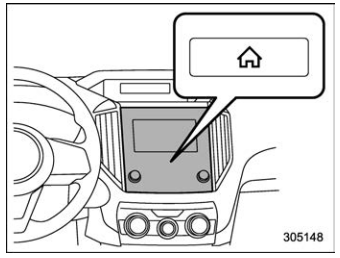
 button.
Select “Settings”.
Select “Vehicle”.
Select “Time/Date” and then select “Manual”.
button.
Select “Settings”.
Select “Vehicle”.
Select “Time/Date” and then select “Manual”.
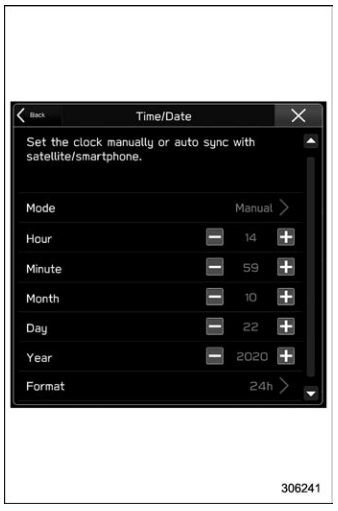
 to complete the
clock
setting.
to complete the
clock
setting.
