
Kia Telluride (LQ2, 2027-2026) Owner's Manual / Driver assistance guide / Driver Attention Warning (DAW) / Driver Attention Warning settings
Subaru Forester: Driver Attention Warning (DAW) / Driver Attention Warning settings
|
|
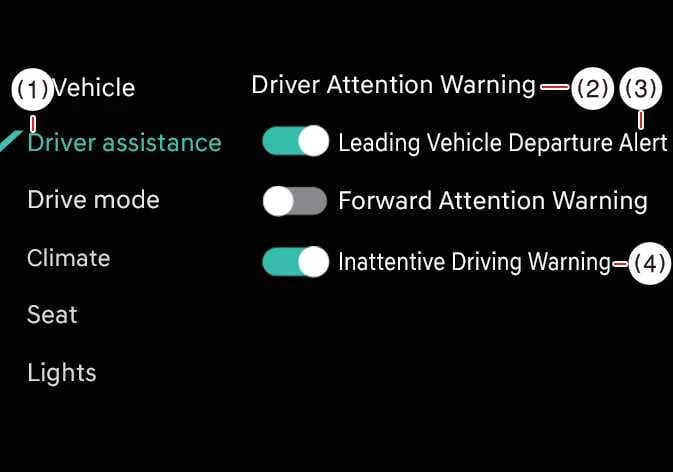
While the vehicle is ON, tap Setup > Vehicle > Driver Assistance > Driver Attention Warning on the infotainment system screen to adjust the available DAW functions.
-
Leading Vehicle Departure Alert: Driver Attention Warning informs the driver when a detected vehicle in front starts moving from a stopped position.
-
Inattentive Driving Warning: The Inattentive Driving Warning function of DAW can be turned on or off according to the driver’s preference.

 Driver Attention Warning operation
Inattentive Driving Warning function
The main purpose of Driver Attention Warning is to advise the driver to take a break when the system detects signs of reduced attention during driving...
Other information:
Subaru Forester 2019-2026 Owners Manual: Alarm system setting
To change the setting of your vehicle’s alarm system for activation or deactivation, do the following. Disarm the alarm system. Refer to “Disarming the system”. Sit in the driver’s seat and shut all doors, the rear gate and engine hood...
Kia Telluride (LQ2, 2027-2026) Owner's Manual: Remote Smart Parking Assist (RSPA): (if equipped)
Remote Smart Parking Assist leverages a comprehensive suite of advanced front, front-side, rear-side, and rear ultrasonic sensors strategically positioned around the vehicle. This intelligent driver-assistance system actively detects suitable parking spaces and manages automated steering, speed control, and smooth gear transitions...
Categories
- Manuals Home
- Daytime running light system
- Replacing battery of access key fob
- To activate/deactivate the X-MODE
- New on site
- Most important about car
Warning screen
Example of warning
If there is a warning message or a maintenance notification, it will appear on this screen. Take the appropriate actions based on the messages indicated.

Copyright © 2026 www.suforester5.com