
Subaru Forester: Driver assistance guide / Rear Cross-traffic Collision-avoidance Assist (RCCA)
Rear Cross-traffic Collision-avoidance Assist is designed to help detect vehicles approaching from the left or right behind the Kia Telluride while reversing. When a possible collision risk is detected, the system can warn the driver with a message and audible alert, and it may also assist with braking to help reduce the chance of a collision.
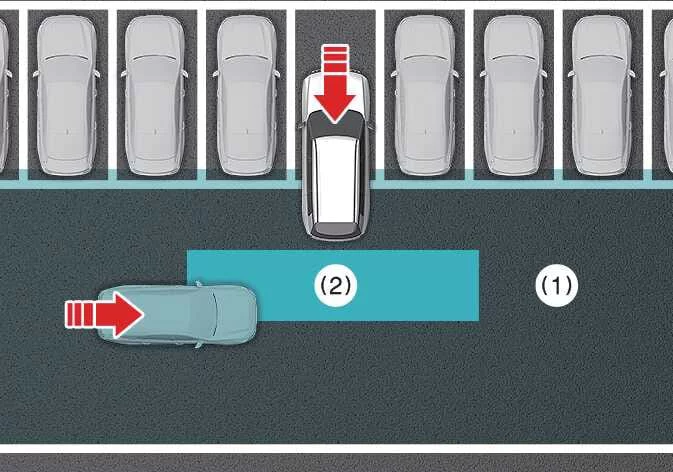
|
-
Rear Cross-Traffic Collision Warning operating range
-
Rear Cross-Traffic Collision-avoidance Assist operating range
TIP
The timing of the warning may vary depending on how quickly the approaching vehicle is moving.
Detection sensor
Please refer to Detecting sensor(s) for the applicable sensors and their locations.
TIP
For more information about the rear corner radar, refer to Blind-spot Collision-avoidance Assist (BCA).
- Rear Cross-Traffic Collision-avoidance Assist settings
- Rear Cross-Traffic Collision-avoidance Assist operation
- Rear Cross-Traffic Collision-avoidance Assist malfunction and limitations

 Rear Cross-Traffic Collision-avoidance Assist settings
Rear Cross-Traffic Safety
Driver Assistance
Parking Safety
Rear Cross-Traffic Safety
While the vehicle is ON, select Setup > Vehicle
> Driver..
Other information:
Subaru Forester 2019-2026 Owners Manual: Auto Vehicle Hold function
The Auto Vehicle Hold function will automatically keep the vehicle stopped even after releasing the brake pedal when the vehicle is at a complete stop, such as at traffic signals. WARNING Do not use the Auto Vehicle Hold function on a steep hill or slippery road...
Subaru Forester 2019-2026 Owners Manual: Unlock using PIN Code Access
When all doors including the rear gate are locked, you can unlock the doors (including rear gate) without a key by pressing the rear lock button. Rear lock button NOTE PIN Code Access will be helpful if the key fob is accidentally left in the vehicle...
Categories
- Manuals Home
- Instrument panel
- Replacing battery of access key fob
- If the passenger’s frontal airbag OFF indicator illuminates and the ON indicator turns off even when the front passenger’s seat is occupied by an adult
- New on site
- Most important about car
Driving information display
NOTE
You can set the units for both the multifunction display (black and white) and the combination meter at the same time. For details about setting the language and units, refer to “Type A combination meter” or “Menu screens”.
