
Subaru Forester: Safe Exit Assist (SEA) / Safe Exit Assist settings
Safe Exit
|
|
While the Kia Telluride is ON, open Setup > Vehicle > Driver Assistance > Driving Safety > Safe Exit on the infotainment display to enable or adjust the Safe Exit Assist feature.
WARNING
Always check the surrounding traffic before opening any door. If Safe Exit is turned off, Safe Exit Assist cannot provide warnings or protective assistance.
CAUTION
-
Do not rely on the system while towing a trailer or another vehicle, or when using a cargo carrier or equipment that may interfere with sensor operation or alter vehicle balance. Under these conditions, Safe Exit Assist may not function as intended.
-
When a trailer or carrier is connected, configure the trailer/carrier menu if your Kia Telluride is equipped with this feature. If the connection is detected automatically using genuine Kia components or selected manually by the driver, certain driver assistance functions may operate with limitations. Refer to the Driver Assistance System limitations section and always drive carefully.
NOTE
Safe Exit Assist remembers its previous setting, so the function remains enabled or disabled after the vehicle is restarted.
Warning Methods
|
|
|
To customize the Warning Methods while the vehicle is ON, select Setup > Vehicle > Driver Assistance > Warning Methods on the infotainment screen. The following options are available:
-
Warning Volume: Adjusts the loudness of the audible warning tones.
-
Driving Safety Priority: Automatically lowers the volume of other audio sources whenever a driving safety warning is issued.
TIP
-
Your selected Warning Methods may also be shared with other compatible Kia Telluride driver assistance systems.
-
The chosen Warning Methods settings are retained even after the vehicle is turned OFF and started again.
-
Depending on your Kia Telluride model, trim level, or equipment, some Warning Methods menu items may not be available.

 Safe Exit Assist operation. Warning and control
Warning and control
Safe Exit Assist on the Kia Telluride provides the following functions to help protect occupants when exiting the vehicle:
Vehicle Detection
Collision Warning (when exiting the vehicle)
Safe Exit Assist linked to Electronic child safety lock
V..
Other information:
Subaru Forester 2019-2026 Owners Manual: Top tether anchorages. Anchorage location
This vehicle is equipped with three top tether anchorages so that a child restraint system having a top tether can be installed in the rear seat. When installing such a child restraint system, proceed as follows, while observing the instructions from the child restraint system manufacturer...
Subaru Forester 2019-2026 Owners Manual: Glossary of tire terminology
Accessory weight The combined weight (in excess of those standard items which may be replaced) of automatic transmission, power steering, power brakes, power windows, power seats, radio, and heater, to the extent that these items are available as factory-installed equipment (whether installed or not)...
Categories
- Manuals Home
- Reclining the seatback (if equipped)
- RAB warning light (if equipped)
- Vehicle load limit – how to determine
- New on site
- Most important about car
Average vehicle speed
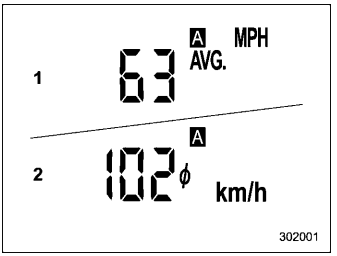
This display shows the average vehicle speed since the trip meter was last reset. Pressing the TRIP RESET switch toggles the display between the average vehicle speed corresponding to the A trip meter display and the average vehicle speed corresponding to the B trip meter display. When either of the trip meter displays is reset, the corresponding average vehicle speed value is also reset.
