
Subaru Forester 2019-2026 Owners Manual / Maintenance and service / Replacement of wiper blades / Windshield wiper blade assembly
Subaru Forester: Replacement of wiper blades / Windshield wiper blade assembly
- Raise the wiper arm off the windshield.
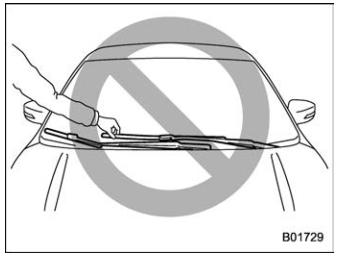
CAUTION
Hold the wiper arm when replacing the wiper blade. Holding the wiper blade, may result in blade deformation.
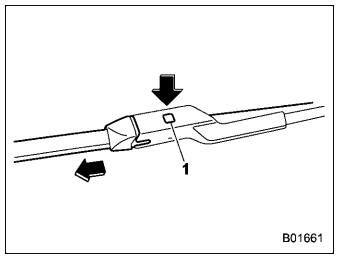
Lock knob
- Hold the wiper blade connection by
hand, push the lock knob to release the
lock, and then pull out the wiper blade
assembly.
NOTE
Do not use a hard object to push the lock knob. The lock knob may be scratched.
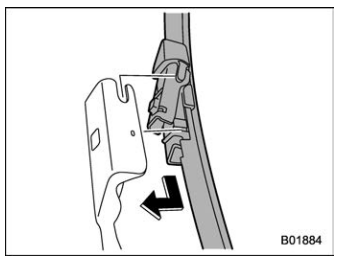
- When installing the wiper blade assembly, align it with the wiper arm connection part and then slide it in the opposite direction of removal to install. After installing the wiper blade assembly, check that the connection part is locked completely.
- Hold the wiper arm by hand and slowly lower it in position.

 Windshield wiper blade rubber
Replace the wiper blade rubber according to the following procedure.
Slit
Pull the wiper blade rubber from the
right side in the order of (1), (2) and (3) until
the slit on the wiper blade can be seen
position...
Other information:
Subaru Forester 2019-2026 Owners Manual: Components
SRS frontal airbag SRS side airbag SRS curtain airbag SRS knee airbag The SRS airbags are stowed in the following locations. Driver’s SRS frontal airbag: in the center portion of the steering wheel A “SRS AIRBAG” mark is located at the pad of the airbag...
Subaru Forester 2019-2026 Owners Manual: Tire labeling
Many markings (e.g. Tire size, Tire Identification Number or TIN) are placed on the sidewall of a tire by tire manufacturers. These markings can provide you with useful information on the tire. Tire size Your vehicle comes equipped with P-Metric tire size...
Categories
- Manuals Home
- All-Wheel Drive warning light
- Automatic door locking/unlocking
- Daytime running light system
- New on site
- Most important about car
How to get the source code using the open source
Free/Open Source Software Information
This product contains Free/Open Source Software (FOSS).
The license information and/or the source code of such FOSS can be found at the following URL.
http://www.globaldenso.com/en/opensource/ivi/subaru/

Copyright © 2026 www.suforester5.com