
Subaru Forester 2019-2026 Owners Manual / Instruments and controls / Setting screen / How to get the source code using the open source
Subaru Forester: Setting screen / How to get the source code using the open source
Free/Open Source Software Information
This product contains Free/Open Source Software (FOSS).
The license information and/or the source code of such FOSS can be found at the following URL.
http://www.globaldenso.com/en/opensource/ivi/subaru/
 Initialize
Y..
 Clock
Clock
For models with a SUBARU genuine
navigation and/or audio system, the clock
can be adjusted using either auto mode or
manual mode.
Auto mode: automatic clock adjustment
Manual mode: manual clock adjustment
CAUTION
The clock in the multi-function display
(color LCD) cannot be adjusted,
if the..
Other information:
Subaru Forester 2019-2026 Owners Manual: Electronic parking brake
Parking brake switch Indicator light Release the electronic parking brake Apply the electronic parking brake WARNING Before exiting the vehicle, make sure that you turn off the engine. Otherwise, the parking brake may be released and an accident may occur...
Kia Telluride (LQ2, 2027-2026) Owner's Manual: Highway Lane Change Assist (if equipped)
Display and control The status of the Highway Lane Change Assist system in your Kia Telluride is conveniently monitored directly through the instrument cluster. For a deeper understanding of these visual cues and how to navigate the settings, please refer to the comprehensive LCD display modes section in your owner's manual...
Categories
- Manuals Home
- RAB warning light (if equipped)
- Low fuel warning light
- Disabling functions
- New on site
- Most important about car
Average vehicle speed
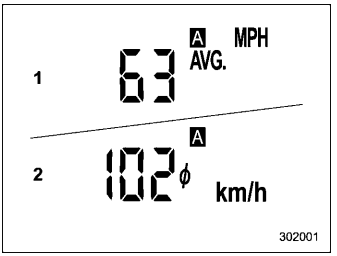
This display shows the average vehicle speed since the trip meter was last reset. Pressing the TRIP RESET switch toggles the display between the average vehicle speed corresponding to the A trip meter display and the average vehicle speed corresponding to the B trip meter display. When either of the trip meter displays is reset, the corresponding average vehicle speed value is also reset.

Copyright © 2026 www.suforester5.com