
Subaru Forester 2019-2026 Owners Manual / Instruments and controls / Light control switch / High beam assist function (if equipped)
Subaru Forester: Light control switch / High beam assist function (if equipped)
NOTE
- The high beam assist function utilizes the stereo camera installed at the position of the front map lights.
- For details on how to handle the stereo camera, refer to the Owner’s Manual supplement for the EyeSight system.
The high beam assist function automatically changes the headlight from high beam to low beam (or vice versa).
When all of the following conditions are met, the headlight will change to high beam.
- When the vehicle speed increases to or above 20 mph (32 km/h).
- There is no preceding or oncoming vehicle.
- The forward area of the vehicle is dark.
- The road does not have a sharp curve.
When any of the following conditions are met, the headlight will change to low beam.
- When the vehicle speed decreases to or below 10 mph (16 km/h).
- When the forward area of the vehicle is bright.
- When there is a preceding or oncoming vehicle.
- When the EyeSight system is malfunctioning or is temporarily stopped.
NOTE
- Do not overestimate the capacity of the high beam assist function. The driver always has the responsibility to understand the surrounding situation, to drive safely, and to change the headlight mode manually if necessary.
- The factory setting (default setting) for this function is set as “operational”. This setting can be changed to OFF (non-operation) at SUBARU dealers. For more details, contact a SUBARU dealer.
 Headlight flasher
CAUTION
Do not hold the lever in the flashing
position for more th..
 How to use the high beam assist function
The high beam assist function will be
activated when all the following conditions
are met.
The light control switch is in the “AUTO”
position and the low beam headlights are
on automatically...
Other information:
Subaru Forester 2019-2026 Owners Manual: Examples of the types of accidents in which it is possible that the SRS side airbag and the SRS curtain airbag will deploy
Hitting a curb, edge of pavement or hard surface Falling into or jumping over a deep hole Landing hard or vehicle falling It is possible that the SRS side and curtain airbags will deploy if a serious impact occurs to the underside of your vehicle...
Kia Telluride (LQ2, 2027-2026) Owner's Manual: Reclining seatback
To recline the seatback: Push the recline control switch forward or backward until the seatback reaches the preferred angle. Release the switch once the desired seating position has been selected...
Categories
- Manuals Home
- Alarm system setting
- Auto Start Stop warning light/Auto Start Stop OFF indicator light (yellow)
- RAB warning light (if equipped)
- New on site
- Most important about car
Type B multi-function display (color LCD)
Turn the ignition switch to “ON”.
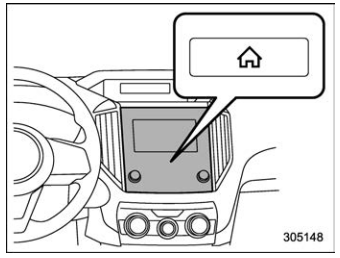
 button.
Select “Settings”.
Select “Vehicle”.
Select “Time/Date” and then select “Manual”.
button.
Select “Settings”.
Select “Vehicle”.
Select “Time/Date” and then select “Manual”.
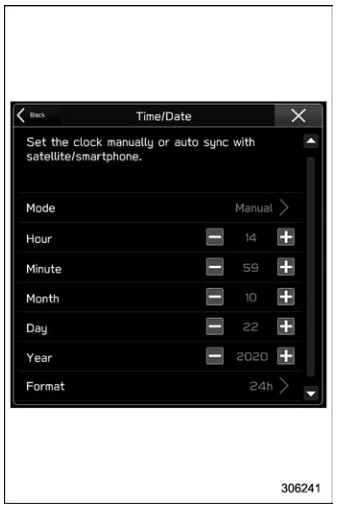
 to complete the
clock
setting.
to complete the
clock
setting.

Copyright © 2026 www.suforester5.com