
Subaru Forester: BSD/RCTA (if equipped) / Rear Cross Traffic Alert (RCTA)
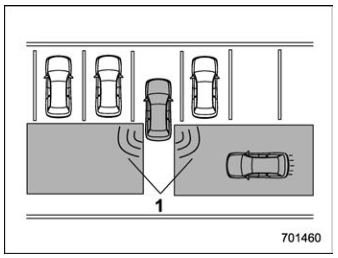
- Operating range
The system notifies the driver of another vehicle approaching from either side when driving in reverse. This feature helps the driver check the rear and side areas of the vehicle when moving backward.
If the system detects a vehicle approaching from either side while moving backward, it warns the driver of dangers in the following way.
- The BSD/RCTA approach indicator light(s) on the outside mirror(s) flashes.
- A warning buzzer sounds.
- An icon appears on the rear view camera screen (audio/navigation monitor)
Limitations of the detectability of RCTA
Since the detectability of RCTA is limited, the RCTA may not operate properly in angled parking.
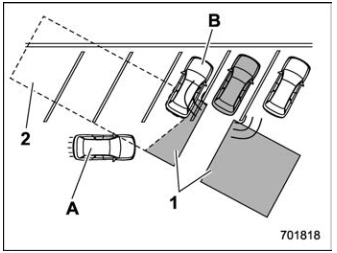
Example 1
- The detection range of the radar sensors
- Area out of detection range of the radar sensors
- Vehicle that may not be detected.
- Parked vehicle
WARNING
An approaching vehicle (A) may not be detected because the detection range is limited by the parked vehicle (B). Always be sure to check the surroundings when reversing the vehicle.
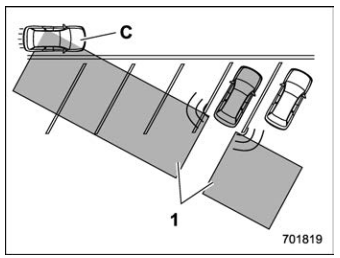
Example 2
1) The detection range of the radar sensors
C) Vehicle that may be detected.
NOTE
The system may detect that a vehicle (C) is passing in front of your vehicle. Always be sure to check the surroundings when reversing the vehicle.


Other information:
Kia Telluride (LQ2, 2027-2026) Owner's Manual: This device complies with Part 15 of the FCC rules.
Operation of this device is subject to the following two conditions: This device may not cause harmful interference. This device must accept any interference received, including interference that could cause undesired operation. TIP Changes or modifications that are not expressly approved by the party responsible for compliance may void the user's authority to operate this equipment...
Kia Telluride (LQ2, 2027-2026) Owner's Manual: Power liftgate: (if equipped)
Power liftgate operating conditions The Kia Telluride power liftgate is designed to provide convenient access to the cargo area while maintaining safe operation. The system operates when the vehicle is running and the transmission is in P (Park). When the vehicle is OFF, the liftgate can still be operated regardless of gear position...
Categories
- Manuals Home
- Unlock using PIN Code Access
- Changing a flat tire
- Reverse Automatic Braking (RAB) system ON/OFF setting
- New on site
- Most important about car
Average vehicle speed
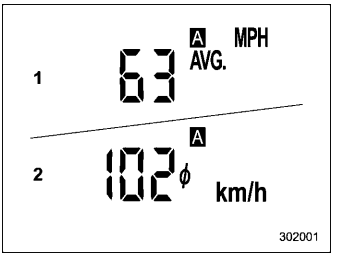
This display shows the average vehicle speed since the trip meter was last reset. Pressing the TRIP RESET switch toggles the display between the average vehicle speed corresponding to the A trip meter display and the average vehicle speed corresponding to the B trip meter display. When either of the trip meter displays is reset, the corresponding average vehicle speed value is also reset.
