
Subaru Forester 2019-2026 Owners Manual / Starting and operating / Reverse Automatic Braking (RAB) system (if equipped) / Reverse Automatic Braking (RAB) system overview
Subaru Forester: Reverse Automatic Braking (RAB) system (if equipped) / Reverse Automatic Braking (RAB) system overview
The system detects objects using sonar sensors installed in the rear bumper.
- If the system determines a possible collision with an object in the reversing direction, automatic deceleration will be activated. Also, beeping sounds will activate.
- If the vehicle is further reversed, automatic hard braking will be applied and a continuous beeping sound will activate.
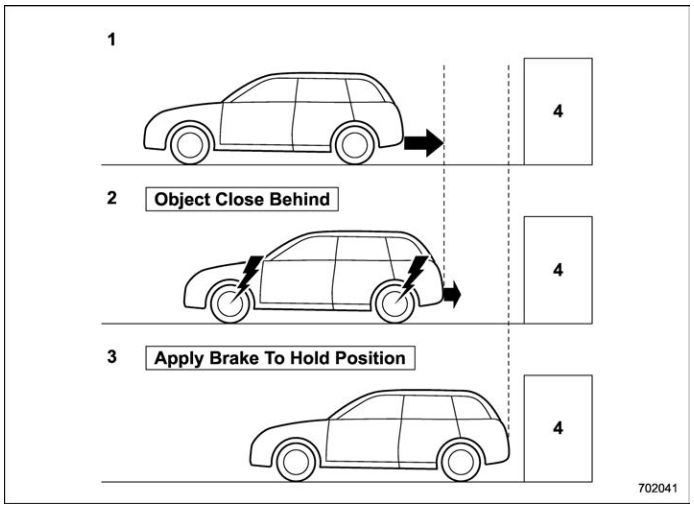
- When reversing
- When either strong automatic braking or torque control is applied to prevent collision (in this case, short warning beeps or continuous warning beeps will sound)
- When the vehicle is stopped by the system (in this case, the continuous beep will remain sounding)
- Object (e.g., a wall)

 Detecting range
Detecting range (width): Approximately 6
in (15 cm) outside of the vehicle width
Range that the system cannot detect:
Approximately 20 in (50 cm) behind the
rear of the vehicle
Detecting range (length): Approximately
5 ft (1...
Other information:
Kia Telluride (LQ2, 2027-2026) Owner's Manual: With the mechanical key
The mechanical key can be used to manually lock or unlock the driver's door whenever the smart key battery is discharged or the electronic locking system is unavailable...
Subaru Forester 2019-2026 Owners Manual: Multi-function display (black and white)
NOTE For models with multi-function display (color LCD), refer to “Multi-function display (color LCD)”. Outside temperature indicator X-MODE indicator (if equipped) Driving information display Clock With the ignition switch in the “ACC” position, the clock appears on the display...
Categories
- Manuals Home
- Disabling functions
- Reclining the seatback (if equipped)
- How to use the high beam assist function
- New on site
- Most important about car
Driving information display
NOTE
You can set the units for both the multifunction display (black and white) and the combination meter at the same time. For details about setting the language and units, refer to “Type A combination meter” or “Menu screens”.

Copyright © 2026 www.suforester5.com