
Subaru Forester: Remote engine start system (dealer option) / Alternate operation method for models with “keyless access with push-button start system”
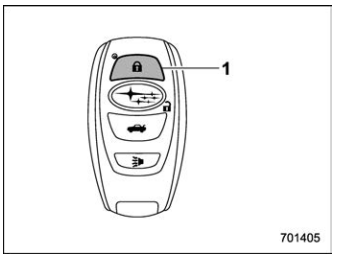
Access key fob
- Lock button
An access key fob can be used as the remote engine start transmitter. Operate the lock button to start or stop the engine as follows.
Before starting the engine
Before using the remote engine start system to start the engine, confirm the following conditions.
- The select lever is in the “P” position.
- All doors including the rear gate are closed.
- The engine hood is closed.
- The push-button ignition switch is in the “OFF” position.
When starting the engine
To start the engine with remote engine start system, briefly press the lock button twice within 2 seconds, then press and hold the lock button for 3 seconds.
- Press the lock button briefly. The hazard warning flashers then flash once and the keyless buzzer chirps once.
- Within 2 seconds, press the lock button briefly again. The hazard warning flashers then flash once again, and the keyless buzzer chirps once again.
- After step 2, immediately press and hold the lock button. Some exterior lights then flash three times, and the horn will honk once.
Approximately 3 seconds after step 3, release the lock button. The engine will then start successfully.
When stopping the engine
Press and hold the lock button to stop the engine with remote engine start system.
Remote start safety features
For detailed information, refer to “Remote start safety features”.

 Entering the vehicle while it is running via remote start (models without
“keyless access with push-button start system”)
Entering the vehicle while it is running via remote start (models without
“keyless access with push-button start system”)
Unlock the vehicle doors using the
remote keyless entry system.NOTE
If the vehicle’s doors are unlocked
manually using the key, the vehicle’s
alarm system will trigger (if the alarm
system is armed prior to activating the
remote engine start system) and the
engine will turn off...
Other information:
Subaru Forester 2019-2026 Owners Manual: Turn off display of driving information display
Select the blank space in the menu to exit the driving information display selection. NOTE The average fuel consumption and average vehicle speed are calculated even while the driving information display is not displayed. Even if you turn off the driving information display, the display will automatically turn on when the battery voltage is disconnected and then reconnected for battery replacement or fuse replacement...
Subaru Forester 2019-2026 Owners Manual: Registering and deleting a user
Users can be registered in the Driver Monitoring System, and registered users can be deleted. For the user registration and delete procedures, refer to “Driver Monitoring System settings”. NOTE When the Driver Monitoring System OFF indicator, Driver Monitoring System temporary stop indicator, or Driver Monitoring System warning is illuminated, the following items cannot be selected...
Categories
- Manuals Home
- Subaru Forester Owners Manual
- Subaru Forester Service Manual
- Auto Start Stop warning light/Auto Start Stop OFF indicator light (yellow)
- Low fuel warning light
- Vehicle load limit – how to determine
- New on site
- Most important about car
Setting the clock manually
