
Subaru Forester: Climate control panel / Type A
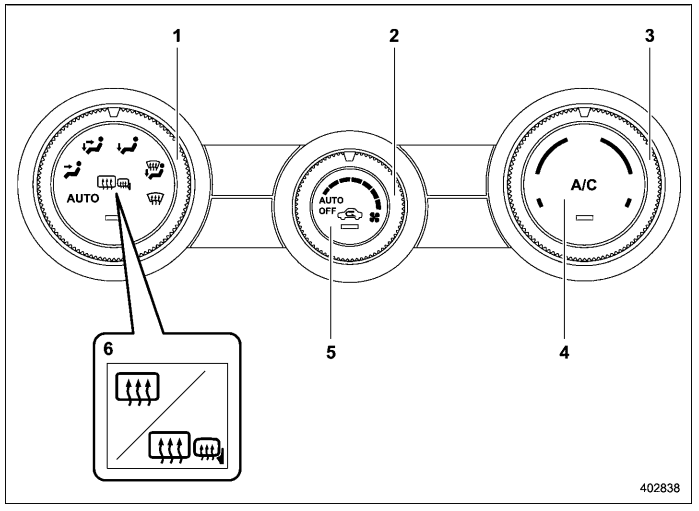
- Airflow mode selection dial (Refer to “Airflow mode selection”)
- Fan speed control dial (Refer to “Fan speed control”)
- Temperature control dial (Refer to “Temperature control”)
- Air conditioner button (Refer to “Air conditioner control”)
- Air inlet selection button (Refer to “Air inlet selection”)
- Rear window defogger button and outside mirror defogger button (if equipped) (Refer to “Defogger and deicer”)
NOTE
The controllable temperature range may vary depending on the regional specifications of the vehicle.

 Type B
Driver’s side temperature control dial
(Refer to “Automatic climate control
operation” and/or “Temperature
control”)
AUTO button (Refer to “Automatic climate
control operation”)
Air conditioner button (Refer to “Air
conditioner control”)
Air inlet selection button (..
Other information:
Kia Telluride (LQ2, 2027-2026) Owner's Manual: Driving with a trailer
Towing a trailer with your Kia Telluride requires practice and careful preparation. Before beginning a long trip, spend time becoming familiar with how the vehicle responds with the additional weight of the trailer. Acceleration, braking, cornering, and overall handling will feel different than when driving without a trailer, and your combined vehicle length will require extra attention in all driving situations...
Subaru Forester 2019-2026 Owners Manual: Driving on snowy and icy roads
To prevent skidding and slipping, avoid sudden braking, abrupt acceleration, highspeed driving, and sharp turning when driving on snowy or icy roads. Always maintain ample distance between your vehicle and the vehicle ahead of you to avoid the need for sudden braking...
Categories
- Manuals Home
- Reverse Automatic Braking (RAB) system ON/OFF setting
- To activate/deactivate the X-MODE
- Unlock using PIN Code Access
- New on site
- Most important about car
Windshield wiper and washer switches
The wiper operates only when the ignition switch is in the “ON” or “ACC” position.

Copyright © 2026 www.suforester5.com