
Subaru Forester: Climate control panel / Type C
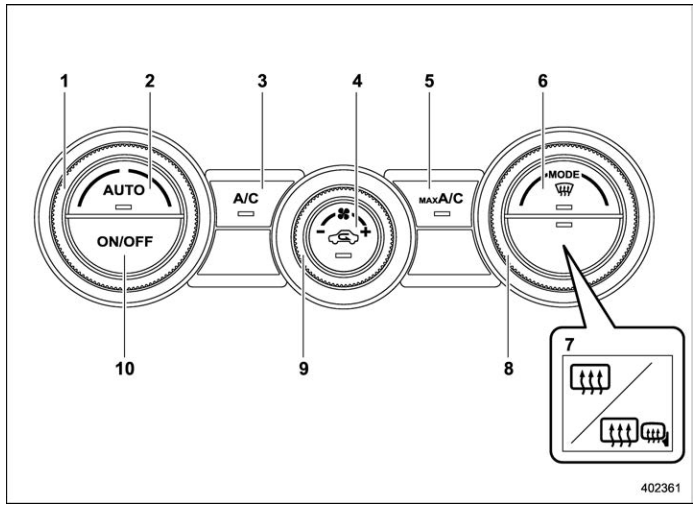
- Temperature control dial (Refer to “Automatic climate control operation”and/or “Temperature control”)
- AUTO button (Refer to “Automatic climate control operation”)
- Air conditioner button (Refer to “Air conditioner control”)
- Air inlet selection button (Refer to “Air inlet selection”)
- MAX A/C button (Refer to “MAX A/C mode (for type B and C)”)
- Defroster button (Refer to “Defrosting”)
- Rear window defogger button and outside mirror defogger button (Refer to “Defogger and deicer”)
- Airflow mode selection dial (Refer to “Airflow mode selection”)
- Fan speed control dial (Refer to “Fan speed control”)
- ON/OFF button (Refer to “Automatic climate control operation”)
NOTE
The climate control screen is displayed on the multi-function display (color LCD). Refer to “Climate control screen”.
 Type B
..
 Automatic climate control operation
When this mode is selected, the fan speed,
airflow distribution, air-inlet control, and air
conditioner compressor operation are
automatically controlled...
Other information:
Kia Telluride (LQ2, 2027-2026) Owner's Manual: Power liftgate: (if equipped)
Power liftgate operating conditions The Kia Telluride power liftgate is designed to provide convenient access to the cargo area while maintaining safe operation. The system operates when the vehicle is running and the transmission is in P (Park). When the vehicle is OFF, the liftgate can still be operated regardless of gear position...
Kia Telluride (LQ2, 2027-2026) Owner's Manual: Effective use of TPMS
Every tire installed on your Kia Telluride, including the compact spare tire (if equipped), should be thoroughly checked monthly when cold and adjusted to the exact inflation pressure specified on the driver's side B-pillar tire information placard. (If your vehicle is fitted with aftermarket or non-standard tire sizes different from those listed on the tire information placard, you should consult a tire specialist to establish the correct cold inflation pressure for those specific tire dimensions...
Categories
- Manuals Home
- Reclining the seatback (if equipped)
- Daytime running light system
- If the passenger’s frontal airbag OFF indicator illuminates and the ON indicator turns off even when the front passenger’s seat is occupied by an adult
- New on site
- Most important about car
Warning screen
Example of warning
If there is a warning message or a maintenance notification, it will appear on this screen. Take the appropriate actions based on the messages indicated.

Copyright © 2026 www.suforester5.com