
Subaru Forester: Sun visors / Vanity mirror with light (if equipped)
CAUTION
Keep the vanity mirror cover closed while the car is being driven to avoid being distracted by the light.
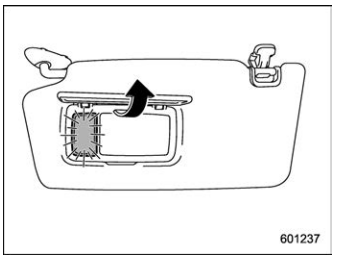
To use the vanity mirror, swing down the sun visor and open the vanity mirror cover. The light beside the vanity mirror illuminates when the mirror cover is opened.
NOTE
Use of the vanity mirror light for a long period of time while the engine is not running can cause battery discharge.
 Vanity mirror
C..
 Overhead console
To open the console, push on the lid lightly
and it will automatically open.
CAUTION
When your vehicle is parked in the
sun or on a warm day, the inside of
the overhead console heats up...
Other information:
Subaru Forester 2019-2026 Owners Manual: Power rear gate (if equipped)
WARNING When operating the power rear gate, observe the following precautions. Ignoring the precautions may result in an injury (e. g., anyone’s body is hit against the rear gate or is caught in the rear gate, etc.) Make sure there are no people around the rear gate...
Subaru Forester 2019-2026 Owners Manual: Synthetic leather upholstery
The synthetic leather material used on the SUBARU may be cleaned using mild soap or detergent and water, after first vacuuming or brushing away loose dirt. Allow the soap to soak in for a few minutes and wipe off with a clean, damp cloth. Commercial foam-type cleaners suitable for synthetic leather materials may be used when necessary...
Categories
- Manuals Home
- All-Wheel Drive warning light
- Instrument panel
- If the passenger’s frontal airbag OFF indicator illuminates and the ON indicator turns off even when the front passenger’s seat is occupied by an adult
- New on site
- Most important about car
Average vehicle speed
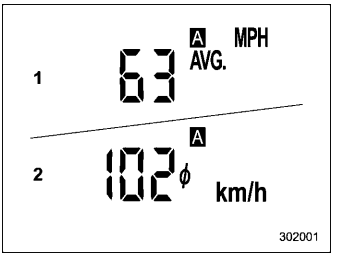
This display shows the average vehicle speed since the trip meter was last reset. Pressing the TRIP RESET switch toggles the display between the average vehicle speed corresponding to the A trip meter display and the average vehicle speed corresponding to the B trip meter display. When either of the trip meter displays is reset, the corresponding average vehicle speed value is also reset.
