
Subaru Forester: Maintenance and service / Air cleaner element
WARNING
Do not operate the engine with the air cleaner element removed. The air cleaner element not only filters intake air but also stops flames if the engine backfires. If the air cleaner element is not installed when the engine backfires, you could be burned.
CAUTION
When replacing the air cleaner element, use a genuine SUBARU air cleaner element. If it is not used, it will cause a negative effect to the engine.
The air cleaner element functions as a filter screen. When the element is perforated or removed, engine wear will be excessive and engine life shortened.
It is not necessary to clean or wash the air cleaner element.
Replacing the air cleaner element
Replace the air cleaner element according to the maintenance schedule in the “Warranty and Maintenance Booklet”. Under extremely dusty conditions, replace it more frequently. It is recommended that you always use genuine SUBARU parts.
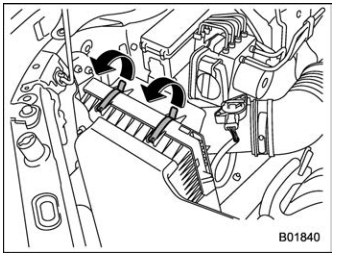
- Unsnap the two clips holding the air cleaner case (rear).
- Open the air cleaner case and pull the
cover rearward while lifting it up.
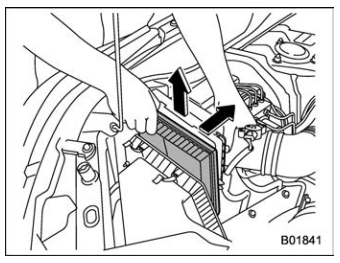
- Remove the air cleaner element.
- Clean the inside of the air cleaner case
(both front and rear) with a damp cloth and
install a new air cleaner element.
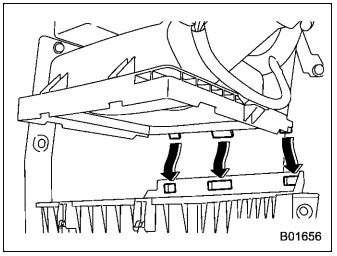
- To install the air cleaner case (rear), insert the three projections on the air cleaner case (rear) into the slits on the air cleaner case (front).
- Install in the reverse order of removal.
NOTE
Install the air cleaner element so that the surface with “UPR” printed on it faces upward.
 Engine coolant
C..
 Spark plugs
It may be difficult to replace the spark
plugs. It is recommended that you have the
spark plugs replaced by your SUBARU
dealer.
The spark plugs should be replaced
according to the maintenance schedule
in the “Warranty and Maintenance Booklet”...
Other information:
Subaru Forester 2019-2026 Owners Manual: Fuse panel located in the passenger compartment
..
Kia Telluride (LQ2, 2027-2026) Owner's Manual: Pretensioner seat belt
Your Kia Telluride is equipped with pretensioner seat belts for the driver, front passenger, and occupants in the second and third seating rows. The pretensioner system is designed to reduce slack in the seat belt during certain types of collisions, allowing the belt to fit more securely against the occupant's body and improving the effectiveness of the restraint system...
Categories
- Manuals Home
- Low fuel warning light
- Auto Start Stop warning light/Auto Start Stop OFF indicator light (yellow)
- Disabling functions
- New on site
- Most important about car
Setting the clock manually
