
Subaru Forester: Infotainment system / Audio system
NOTE
-
If an aftermarket High Intensity Discharge (HID) headlight is installed, the audio system and other electronic components in your Kia Telluride may not operate correctly.
-
When metallic window tint film is applied to the glass, it may interfere with the hi-pass communication function, radio reception, connected vehicle services, and the automatic headlight activation function. Use care during installation, because the solution used when applying the tint may seep into the vehicle interior and damage electronic components.
If your Kia Telluride is equipped with an infotainment system, refer to the separately supplied infotainment manual for more complete operating details and feature instructions.
Glass antenna
|
|
The glass-type antenna is designed to transmit and receive signals such as AM/FM radio and GPS, if equipped. Depending on the vehicle options, the antenna may also support additional signal functions used by convenience, navigation, and connected features.
USB port
Use the USB port to connect a USB storage device or compatible media device to the vehicle.
|
|
-
A USB cable can be used to connect compatible audio devices to the vehicle’s USB port.
-
After a media storage device, such as an MP3 player or USB drive, is connected, music can be played through the Kia Telluride speakers or controlled through the infotainment system.
-
Small electronic devices may also be charged through the USB port when supported by the device and vehicle system.
NOTE
-
Some devices may not charge properly when connected to the USB port.
-
When a portable audio device is connected while using the power outlet, playback noise may occur. If this happens, disconnect the USB cable and operate the portable audio device using its own power source.
How vehicle radio works
AM and FM radio signals are broadcast from transmitter towers located throughout your area. The antenna on the Kia Telluride receives these signals, and the radio system processes them before sending the sound through the vehicle speakers.
In certain situations, the signal reaching the vehicle may not be strong enough to provide clear, consistent sound.
This can occur because of distance from the radio station, nearby stronger stations, buildings, bridges, terrain, or other large obstructions that interfere with signal quality.
FM reception
FM broadcasts use high-frequency signals that generally travel in straight lines and do not follow the curvature of the earth. For this reason, FM reception may begin to fade within a relatively short distance from the station. Buildings, mountains, and other obstructions can also affect FM signals and create poor listening conditions. This is a normal characteristic of radio reception and does not indicate a problem with the radio.
AM reception
AM broadcasts can usually be received over longer distances than FM broadcasts because AM radio waves use lower frequencies. These longer waves follow the curvature of the earth more effectively and can bend around certain obstructions, which helps provide wider signal coverage.
Radio station
The following conditions are normal during vehicle radio operation and do not indicate a malfunction:
-
Fading: As the vehicle moves farther away from a radio station, the signal becomes weaker and the sound may gradually fade. When this occurs, select another station with a stronger signal.
-
Flutter or static: Weak FM signals or large obstructions between the transmitter and the vehicle antenna can disturb the broadcast, causing static or fluttering sounds. Reducing the treble level may help lessen this effect until reception improves.
-
Station swapping: When an FM signal becomes weak, a stronger nearby signal on a close frequency may be received instead. This happens because the radio is designed to lock onto the clearest available signal. Select another station if needed.
-
Multi-path cancellation: Radio signals arriving from several directions can cause distortion or fluttering. This may be caused by a direct signal and a reflected signal from the same station, or by signals from two stations with nearby frequencies. Select another station until the condition passes.
Using a mobile phone or 2-way radio
Using a mobile phone inside the Kia Telluride may cause noise through the audio system. This does not mean the audio equipment is defective. To reduce interference, operate mobile devices as far away from the audio equipment as practical.
When using a communication system, such as a mobile phone or radio set, inside the vehicle, a separate external antenna must be installed. If a mobile phone or radio set is used with only its internal antenna, it may interfere with the vehicle’s electrical system and negatively affect safe vehicle operation.
WARNING
Distracted driving
Driving while distracted can cause loss of vehicle control, which may result in an accident, serious injury, or death. The driver’s primary responsibility is to operate the vehicle safely and legally. Handheld devices, equipment, or vehicle systems that take the driver’s eyes, attention, or focus away from safe driving should never be used while the vehicle is being driven.
WARNING
Mobile phone use
Do not use a mobile phone while driving. Stop the vehicle in a safe location before using a mobile phone.

 AI Assistant: (if equipped)
If equipped, the AI Assistant allows you to interact with your Kia Telluride using natural voice commands...
Other information:
Kia Telluride (LQ2, 2027-2026) Owner's Manual: Gauges
The gauges in your Kia Telluride provide real-time operating information, allowing you to monitor important vehicle systems and driving conditions at a glance. Speedometer Figure 1. Type A Figure 2...
Subaru Forester 2019-2026 Owners Manual: Tire labeling
Many markings (e.g. Tire size, Tire Identification Number or TIN) are placed on the sidewall of a tire by tire manufacturers. These markings can provide you with useful information on the tire. Tire size Your vehicle comes equipped with P-Metric tire size...
Categories
- Manuals Home
- Reverse Automatic Braking (RAB) system ON/OFF setting
- Changing a flat tire
- If the passenger’s frontal airbag OFF indicator illuminates and the ON indicator turns off even when the front passenger’s seat is occupied by an adult
- New on site
- Most important about car
Clock/date screen
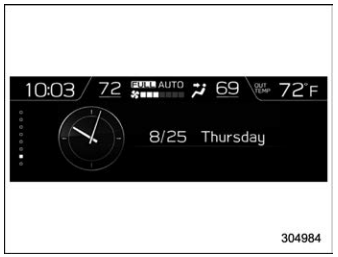
The time and date are displayed. You can adjust the time and date. For details, refer to “Clock”.
