
Subaru Forester: BSD/RCTA (if equipped) / BSD/RCTA OFF switch
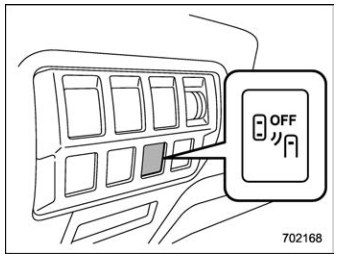
BSD/RCTA OFF switch
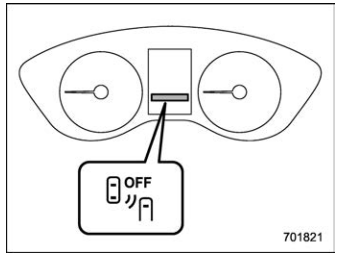
BSD/RCTA OFF indicator light
If the BSD/RCTA OFF switch is pressed, the BSD/RCTA OFF indicator light appears on the combination meter, and the BSD/RCTA is deactivated.
Press the switch again to activate the BSD/ RCTA. The BSD/RCTA OFF indicator light will disappear.
When this occurs, the BSD/RCTA approach indicator light on the side of the rearview mirror illuminates for a few seconds and then turns off.
NOTE
- In the following cases, the system
may not operate properly due to
blocked radar waves. Press the BSD/
RCTA OFF switch to deactivate the
system.
- When towing a trailer
- When a bicycle carrier or other carrier item is fitted to the rear of the vehicle.
- When using a chassis dynamometer or free roller device, etc.
- When running the engine and making the wheels rotate while lifting up the vehicle
- If the ignition switch is turned to the “LOCK”/“OFF” position, the last known status of the system is maintained. For example, if the ignition switch is turned to the “LOCK”/“OFF” position with the BSD/RCTA deactivated, the BSD/RCTA will remain deactivated the next time the ignition switch is turned to the “ON” position.

 Certification for the BSD/RCTA
U.S.-spec. models
FCC ID: OAYSRR3A
CAUTION
FCC WARNING
Changes or modifications not expressly
approved by the party responsible
for compliance could void
the user’s authority to operate the
equipment...
Other information:
Subaru Forester 2019-2026 Owners Manual: Airflow mode selection
Select the airflow mode using the airflow mode selection dial (type A and C) or the airflow mode selection button (type B). Airflow modes are as follows. If equipped Ventilation: Instrument panel outlets If equipped Ventilation 2 for type B and C: Instrument panel outlets and foot outlets If equipped Bi-level: Instrument panel outlets and foot outlets If equipped Heat: Foot outlets, both side outlets of the instrument panel and some through windshield defroster outlets (A small amount of air flows to the windshield and both side windows to prevent fogging...
Kia Telluride (LQ2, 2027-2026) Owner's Manual: Drive mode integrated control system. DRIVE MODE
The drive mode integrated control system in the Kia Telluride allows the driver to choose a driving mode that best matches current road conditions, the surrounding environment, or personal driving preference. DRIVE MODE You can select a suitable drive mode based on your preferred driving feel or the condition of the road ahead...
Categories
- Manuals Home
- Unlock using PIN Code Access
- Steering Responsive Headlight (SRH)
- Reclining the seatback (if equipped)
- New on site
- Most important about car
Average vehicle speed
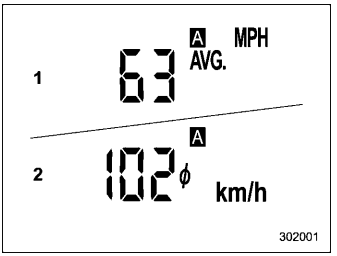
This display shows the average vehicle speed since the trip meter was last reset. Pressing the TRIP RESET switch toggles the display between the average vehicle speed corresponding to the A trip meter display and the average vehicle speed corresponding to the B trip meter display. When either of the trip meter displays is reset, the corresponding average vehicle speed value is also reset.
