
Kia Telluride (LQ2, 2027-2026) Owner's Manual / Seating and safety restraints / Seats / Front seat adjustment for power seat : (if equipped) / Changing seat cushion tilt and height
Subaru Forester: Front seat adjustment for power seat : (if equipped) / Changing seat cushion tilt and height
|
|
The power seat in the Kia Telluride allows independent adjustment of the front and rear sections of the seat cushion, making it easier to achieve a comfortable driving position with proper leg support and visibility.
To change the height of the seat:
- Pull the front portion of the control switch upward to raise the front of the seat cushion, or press it downward to lower the front section.
- Pull the rear portion of the control switch upward to raise the rear of the seat cushion, or press it downward to lower the rear section.
- Release the control switch as soon as the seat reaches the preferred height and tilt position.

 Adjusting lumbar support: (if equipped)
Figure 1. Type A
Figure 2. Type B
The lumbar support system helps improve lower back comfort and reduces fatigue during extended driving...
Other information:
Kia Telluride (LQ2, 2027-2026) Owner's Manual: Over-The-Air (OTA) software update
The Over-The-Air (OTA) software update feature allows your Kia Telluride to receive the latest compatible software wirelessly without requiring a visit to a service center. By keeping the vehicle software up to date, you can benefit from the newest available system improvements and feature enhancements designed for your vehicle...
Subaru Forester 2019-2026 Owners Manual: Emergency Locking Retractor (ELR) and Automatic Locking Retractor (ALR)
Emergency Locking Retractor (ELR) The driver’s seatbelt has an Emergency Locking Retractor (ELR). The emergency locking retractor allows normal body movement but the retractor locks automatically during a sudden stop, impact or if you pull the belt very quickly out of the retractor...
Categories
- Manuals Home
- Unlock using PIN Code Access
- Steering Responsive Headlight (SRH)
- Reverse Automatic Braking (RAB) system ON/OFF setting
- New on site
- Most important about car
Average vehicle speed
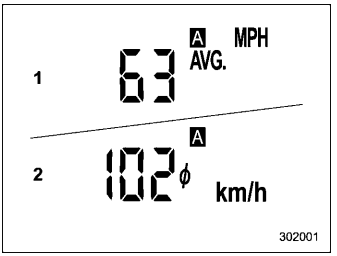
This display shows the average vehicle speed since the trip meter was last reset. Pressing the TRIP RESET switch toggles the display between the average vehicle speed corresponding to the A trip meter display and the average vehicle speed corresponding to the B trip meter display. When either of the trip meter displays is reset, the corresponding average vehicle speed value is also reset.

Copyright © 2026 www.suforester5.com