
Subaru Forester 2019-2026 Owners Manual / Starting and operating / Remote engine start system (dealer option) / Entering the vehicle following remote engine start shutdown
Subaru Forester: Remote engine start system (dealer option) / Entering the vehicle following remote engine start shutdown
An alarm trigger may occur if the vehicle is opened by the remote keyless entry transmitter within a few seconds immediately following remote engine start shutdown.
 Entering the vehicle while it is running via remote start (models with
“keyless access with push-button start system”)
Entering the vehicle while it is running via remote start (models with
“keyless access with push-button start system”)
Unlock the vehicle doors using the
keyless access function and r..
 Pre-heating or pre-cooling the interior of the vehicle
Before exiting the vehicle, set the temperature
controls to the desired setting and
operation. After the system starts the
engine, the heater or air conditioning will
activate and heat or cool the interior to
your setting...
Other information:
Subaru Forester 2019-2026 Owners Manual: Sport (S) mode (if equipped)
F..
Subaru Forester 2019-2026 Owners Manual: Most common causes of corrosion
The most common causes of corrosion are: The accumulation of moisture retaining dirt and debris in body panel sections, cavities, and other areas. Damage to paint and other protective coatings caused by gravel and stone chips or minor accidents...
Categories
- Manuals Home
- Disabling functions
- Low fuel warning light
- Reverse Automatic Braking (RAB) system ON/OFF setting
- New on site
- Most important about car
Type B multi-function display (color LCD)
Turn the ignition switch to “ON”.
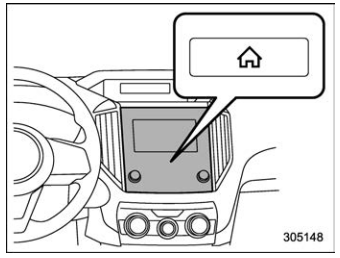
 button.
Select “Settings”.
Select “Vehicle”.
Select “Time/Date” and then select “Manual”.
button.
Select “Settings”.
Select “Vehicle”.
Select “Time/Date” and then select “Manual”.
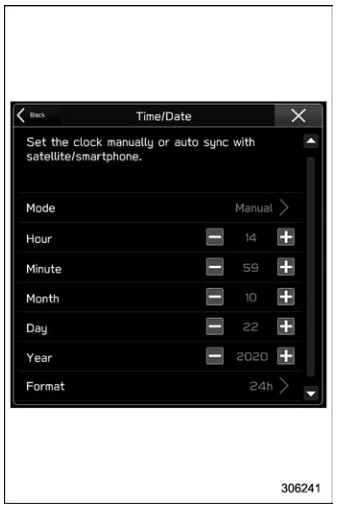
 to complete the
clock
setting.
to complete the
clock
setting.

Copyright © 2026 www.suforester5.com