
Subaru Forester 2019-2026 Owners Manual / Appearance care / Exterior care
Subaru Forester: Appearance care / Exterior care

 Washing
CAUTION
When washing the vehicle, the
brakes may get wet. As a result,
the brake stopping distance will
be longer. To dry the brakes, drive
the vehicle at a safe speed while
lightly depressing the brake pedal
to heat up the brakes...
Other information:
Subaru Forester 2019-2026 Owners Manual: Power window switches
Driver’s side power window switches: For front left window (with one-touch auto up and down feature) For front right window (with one-touch auto up and down feature (if equipped)) For rear left window For rear right window Lock switch All door windows can be controlled by the power window switch cluster on the driver side door...
Kia Telluride (LQ2, 2027-2026) Owner's Manual: LCD Display
The high-resolution LCD display in your Kia Telluride serves as your primary hub for vehicle information, safety alerts, and system settings. You can seamlessly navigate through various display modes and configure settings using the intuitive control buttons conveniently located on your steering wheel...
Categories
- Manuals Home
- Steering Responsive Headlight (SRH)
- Reverse Automatic Braking (RAB) system ON/OFF setting
- Changing a flat tire
- New on site
- Most important about car
Average fuel consumption
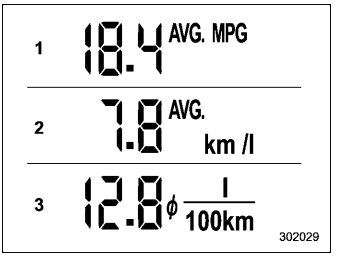
This display shows the average rate of fuel consumption since the trip meter was last reset.

Copyright © 2026 www.suforester5.com