
Subaru Forester 2019-2026 Owners Manual / Instruments and controls / Basic screens / Fuel consumption screen
Subaru Forester: Basic screens / Fuel consumption screen
- Driving range on remaining fuel
- Average fuel consumption corresponding to the driving distance of each trip meter
- Current fuel consumption
- User information (if equipped)
The fuel consumption information is displayed on the screen.
If the driver is recognized by the Driver Monitoring System, average fuel consumption for the driver will be displayed.
NOTE
The driving range on the remaining fuel is only a guide. The indicated value may differ from the actual driving range on the remaining fuel, so you must immediately fill the tank when the low fuel warning light illuminates.
 Audio screen
The screen of the currently selected audio
source is displayed.
For details about how to use the audio set,
refer to the separate navigation/audio
Owner’s Manual...
 Clock/date screen
The time and date are displayed.
You can adjust the time and date. For
details, refer to “Clock”...
Other information:
Subaru Forester 2019-2026 Owners Manual: Wiper intermittent time control
..
Subaru Forester 2019-2026 Owners Manual: Trailer hitch (dealer option)
WARNING Never exceed the maximum weight specified for the trailer hitch. Exceeding the maximum weight could cause an accident resulting in serious personal injuries. Permissible trailer weight changes depending on the situation. For possible recommendations and limitations, refer to “Trailer towing”...
Categories
- Manuals Home
- Alarm system setting
- Low fuel warning light
- Automatic door locking/unlocking
- New on site
- Most important about car
Average fuel consumption
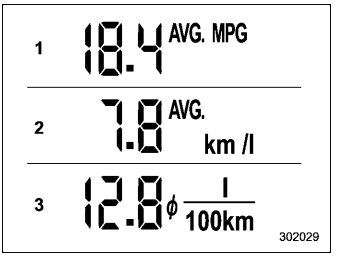
This display shows the average rate of fuel consumption since the trip meter was last reset.

Copyright © 2026 www.suforester5.com