
Subaru Forester 2019-2026 Owners Manual / In case of emergency / Access key fob – if access key fob does not operate properly / Locking and unlocking
Subaru Forester: Access key fob – if access key fob does not operate properly / Locking and unlocking
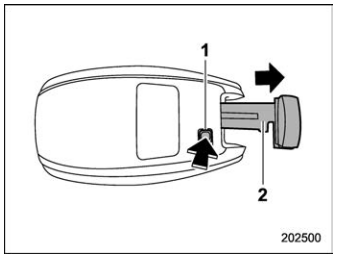
- Release button
- Emergency key
While pressing the release button of the access key fob, take out the emergency key.
Lock or unlock the driver’s door with the emergency key in the procedure described in “Locking and unlocking from the outside”.
NOTE
After locking or unlocking, be sure to attach the emergency key back to the access key fob.

 Switching power status
Apply the parking brake.
Shift the select lever to the “P” (Park)
position.
Depress the brake pedal.
Hold the access key fob with the
buttons facing you, and touch the pushbutton
ignition switch with it...
Other information:
Kia Telluride (LQ2, 2027-2026) Owner's Manual: 12V parking lithium battery: (if equipped)
Certain configurations of the Kia Telluride feature a specialized auxiliary 12V parking lithium battery. This additional power unit delivers a constant and stable electrical supply to support background functions while parked, including Over-The-Air (OTA) system software updates, the automatic A/C drying feature, and CCS operations...
Kia Telluride (LQ2, 2027-2026) Owner's Manual: Blind-Spot Collision-Avoidance Assist malfunction
Check Driver Assistance system. If Blind-Spot Collision-Avoidance Assist is not operating correctly, the Master Warning light () illuminates on the instrument cluster together with a warning message that remains visible for several seconds...
Categories
- Manuals Home
- Changing a flat tire
- Reclining the seatback (if equipped)
- If the passenger’s frontal airbag OFF indicator illuminates and the ON indicator turns off even when the front passenger’s seat is occupied by an adult
- New on site
- Most important about car
Average vehicle speed
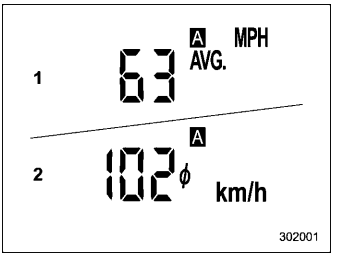
This display shows the average vehicle speed since the trip meter was last reset. Pressing the TRIP RESET switch toggles the display between the average vehicle speed corresponding to the A trip meter display and the average vehicle speed corresponding to the B trip meter display. When either of the trip meter displays is reset, the corresponding average vehicle speed value is also reset.

Copyright © 2026 www.suforester5.com