
Subaru Forester: Blind-Spot Collision-avoidance Assist malfunction and limitations / Blind-Spot Collision-Avoidance Assist malfunction
|
|
If Blind-Spot Collision-Avoidance Assist is not operating correctly, the Master Warning light ( ) illuminates on the instrument cluster together with a warning message that remains visible for several seconds. You can also review the related information through the Service Messages menu in the Utility Information View on the instrument cluster. If this warning appears, have the Kia Telluride inspected by an authorized Kia dealer as soon as possible.
|
|
If the warning indicator integrated into the outside rearview mirror does not function properly, the Master Warning light ( ) and a corresponding warning message will appear on the instrument cluster for several seconds. In this situation, have the Blind-Spot Collision-Avoidance Assist system on your Kia Telluride checked by an authorized Kia dealer.
Blind-Spot Collision-Avoidance Assist disabled
|
|
|
If snow, rain, mud, ice, or other foreign material accumulates around the rear bumper near the rear corner radar sensors, or if a trailer, bicycle rack, cargo carrier, or similar accessory obstructs the sensors, the detection capability of Blind-Spot Collision-Avoidance Assist may be temporarily reduced. Under these conditions, the Kia Telluride may limit or disable the system until normal sensor operation is restored.
When this occurs, a warning message together with the Master Warning light () is displayed on the instrument cluster. This notification indicates that the sensors are temporarily restricted and does not necessarily mean that the system has failed.
Blind-Spot Collision-Avoidance Assist should resume normal operation after the rear corner radar sensors are cleaned, any accumulated snow, rain, dirt, or debris is removed, and any obstruction such as a trailer or carrier has been detached. Restarting the Kia Telluride after clearing the obstruction may also be required. Keeping the sensor areas clean helps maintain reliable performance.
If the system continues to remain unavailable even after the sensors have been cleaned and all external obstructions have been removed, have the Kia Telluride inspected by an authorized Kia dealer to determine the cause of the problem.
WARNING
-
Blind-Spot Collision-Avoidance Assist may still be unable to operate correctly even if no warning message is temporarily displayed on the instrument cluster.
-
The system may also be temporarily limited immediately after the vehicle is turned ON, especially in open areas where nearby objects are not detected or when the radar sensors are blocked by snow, ice, mud, or other foreign material.
WARNING
Turn OFF Blind-Spot Collision-Avoidance Assist before installing or removing a trailer, cargo carrier, or other rear-mounted accessory. Once the installation or removal is complete, turn the system back ON before driving your Kia Telluride.
TIP
You can verify the current operating status of Blind-Spot Collision-Avoidance Assist through the Service Messages section in the Utility Information View of the instrument cluster display.

 Limitations of Blind-Spot Collision-Avoidance Assist
Blind-Spot Collision-Avoidance Assist on the Kia Telluride may function differently than expected or become temporarily limited under certain driving, weather, or environmental conditions...
Other information:
Subaru Forester 2019-2026 Owners Manual: Gross Axle Weight (GAW) and Gross Axle Weight Rating (GAWR)
Gross Axle Weight The total weight applied to each axle (GAW) must never exceed the Gross Axle Weight Rating (GAWR). The front and rear GAWs can be adjusted by relocating passengers and luggage inside the vehicle. The front and rear GAWR of your vehicle that is given by SUBARU are also shown on the certification label located at the bottom of driver’s side door pillar...
Subaru Forester 2019-2026 Owners Manual: Roof rails (if equipped)
Roof rails Cargo can be carried on the roof after securing the crossbars to the roof rails and installing an appropriate carrying attachment. When installing crossbars and a carrying attachment, follow the manufacturer’s instructions. The roof rail system is designed to carry loads (cargo, crossbars and carrying attachment) of no more than 176 lbs (80 kg)...
Categories
- Manuals Home
- RAB warning light (if equipped)
- Automatic door locking/unlocking
- Steering Responsive Headlight (SRH)
- New on site
- Most important about car
Type B multi-function display (color LCD)
Turn the ignition switch to “ON”.
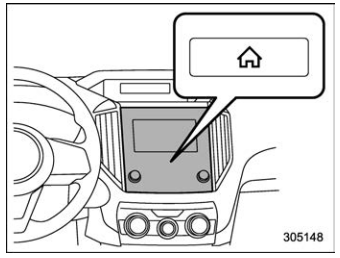
 button.
Select “Settings”.
Select “Vehicle”.
Select “Time/Date” and then select “Manual”.
button.
Select “Settings”.
Select “Vehicle”.
Select “Time/Date” and then select “Manual”.
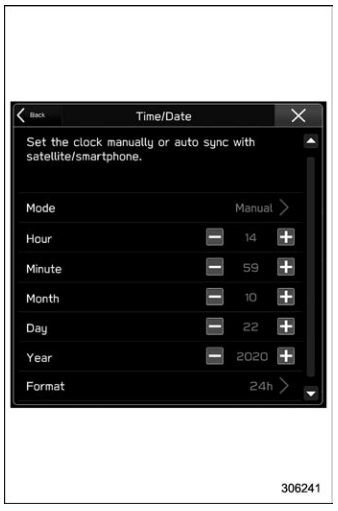
 to complete the
clock
setting.
to complete the
clock
setting.
