
Subaru Forester 2019-2026 Owners Manual / Interior equipment / Interior lights / Rear gate light (if equipped)
Subaru Forester: Interior lights / Rear gate light (if equipped)
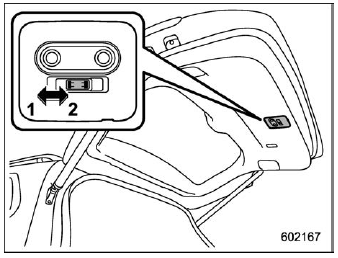
Rear gate light
- OFF
- DOOR
OFF: The light remains off.
DOOR: The rear gate light will illuminate automatically in the following case.
- The rear gate is opened.

 OFF delay timer
The following lights have an automatic
illumination function.
Dome light
Map light
Cargo area light
Rear gate light (if equipped)
When the interior light switch is set to the
“DOOR” position, the light will automatically
turn on and turn off depending on the
locking and unlocking of th..
Other information:
Subaru Forester 2019-2026 Owners Manual: Where to place a child restraint system
The following are SUBARU’s recommendations on where to place a child restraint system in your vehicle. WARNING Several types of child restraint systems may conceal the buckle of the neighboring seat. If the occupant of the neighboring seat cannot correctly fasten the seatbelt, that person must move to a different seat...
Subaru Forester 2019-2026 Owners Manual: Security indicator light
This indicator light shows the status of the alarm system. It also indicates operation of the immobilizer system. Alarm system It blinks to show the driver the operational status of the alarm system. For detailed information, refer to “Alarm system”...
Categories
- Manuals Home
- Reverse Automatic Braking (RAB) system ON/OFF setting
- Reclining the seatback (if equipped)
- Unlock using PIN Code Access
- New on site
- Most important about car
Clock/date screen
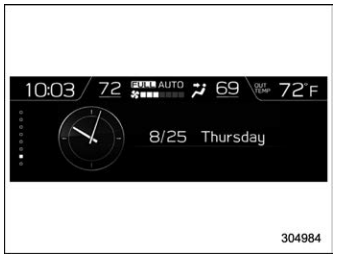
The time and date are displayed. You can adjust the time and date. For details, refer to “Clock”.

Copyright © 2026 www.suforester5.com