
Subaru Forester: Starting and stopping engine (models with push-button start system) / Starting engine
WARNING
- There are some general precautions when starting the engine. Carefully read the precautions described in “Starting engine”.
- If the indicator on the push-button ignition switch flashes in green after the engine has started, never drive the vehicle. The steering is still locked, and it may result in an accident.
CAUTION
- When the operation indicator on the push-button ignition switch is flashing in orange, there may be a malfunction with the vehicle. Contact a SUBARU dealer immediately.
- If the indicator on the push-button ignition switch is flashing in green after the engine has started, it means that the steering is still locked. Depress the brake pedal while moving the steering wheel to the right and left, and press the push-button ignition switch.
- Do not continue pushing the push-button ignition switch for more than 10 seconds. Doing so could cause a malfunction. If the engine does not start, stop pushing the push-button ignition switch. Instead, press the pushbutton ignition switch without depressing the brake pedal to switch the power status to “OFF”. Wait 10 seconds, and then push the push-button ignition switch to start the engine.
NOTE
- For a short time after the engine has started, the engine speed is kept high. When the warm-up is completed, the engine speed lowers automatically.
- When the push-button ignition switch is pressed while depressing the brake pedal, the engine starter operates for a maximum of 10 seconds. After starting the engine, the starter stops automatically.
- When the push-button ignition switch is pressed while depressing the brake pedal, the engine can be started regardless of the status of the push-button ignition switch.
- If the security indicator light illuminates when you attempt to start the engine but the engine does not start, press the push-button ignition switch to switch the power to “OFF” and then try to start the engine again.
- If the engine does not start, press the push-button ignition switch without depressing the brake pedal to switch the power to “OFF”. Then, while depressing the brake pedal more forcefully, press the push-button ignition switch.
- The engine start procedures may not function depending on the radio wave conditions around the vehicle. In such a case, refer to “Starting engine”.
- If the vehicle battery is discharged, the steering cannot be unlocked. Charge the battery.
- Do not shift the select lever while the starter is cranking.
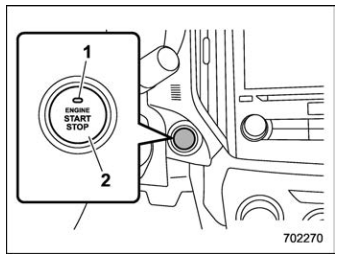
- Operation indicator
- Push-button ignition switch
When the push-button ignition switch is pressed while depressing the brake pedal, the engine will start. The starting procedure for the engine is as follows.
- Carry the access key fob, and sit in the driver’s seat.
- Apply the parking brake.
- Shift the select lever into the “P” position. The engine can also start when the select lever is in the “N” position, however, for safety reasons, start in the “P” position.
- Depress the brake pedal until the operation indicator on the push-button ignition switch turns green. When starting with the select lever in the “N” position, the indicator does not turn green.
- While depressing the brake pedal, press the push-button ignition switch.
NOTE
- While pressing the select lever button in, the indicator on the push-button ignition switch will not turn green even when the select lever is in the “P” position.
- In case the engine does not start by the normal engine start procedure, move the select lever to the “P” position, and switch the power to “ACC”. Depress the brake pedal, and press the push-button ignition switch for at least 15 seconds. The engine may start. Only use this engine start procedure in case of emergency.
- When the engine is not started, the brake pedal may feel stiff. In such a case, depress the brake pedal more forcefully than usual. Check that the operation indicator on the push-button ignition switch turns green, and press the push-button ignition switch to start the engine.

 Stopping engine
Stop the vehicle completely.
Move the select lever to the “P”
position.
Press the push-button ignition switch.
The engine will stop, and the power will be
switched off...
Other information:
Kia Telluride (LQ2, 2027-2026) Owner's Manual: Transmission shift indicator. Automatic transmission shift indicator
The transmission shift indicator provides a clear visual display of the currently selected gear, allowing the driver of the Kia Telluride to quickly confirm the transmission operating mode while driving or when the vehicle is stationary. Automatic transmission shift indicator Figure 1...
Subaru Forester 2019-2026 Owners Manual: Remote control mirror switch
: Select side to adjust : Direction control The remote control mirrors operate only when the ignition switch is in the “ON” or “ACC” position. Turn the control switch to the side that you want to adjust. “L” is for the left mirror, “R” is for the right mirror...
Categories
- Manuals Home
- Auto Start Stop warning light/Auto Start Stop OFF indicator light (yellow)
- How to use the high beam assist function
- Unlock using PIN Code Access
- New on site
- Most important about car
Driving information display
NOTE
You can set the units for both the multifunction display (black and white) and the combination meter at the same time. For details about setting the language and units, refer to “Type A combination meter” or “Menu screens”.

Copyright © 2026 www.suforester5.com