
Subaru Forester 2019-2026 Owners Manual / Starting and operating / BSD/RCTA (if equipped) / BSD/RCTA OFF indicator light / System temporary stop due to reduced
radar sensitivity
Subaru Forester: BSD/RCTA OFF indicator light / System temporary stop due to reduced radar sensitivity
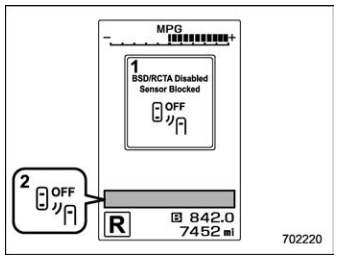
- BSD/RCTA temporary stop message due to reduced radar sensitivity
- BSD/RCTA OFF indicator light
This display appears when the detectability of the radar sensors is reduced. Once the condition is corrected, the system will recover from the temporary stop condition and the indicator will disappear. If the indicator remains displayed for a prolonged time, have the system inspected at a SUBARU dealer.

 BSD/RCTA warning light
System malfunction
BSD/RCTA malfunction message
At first, this message will appear
Then this message will appear
BSD/RCTA warning light
This display appears when a malfunction
occurs in the system...
Other information:
Kia Telluride (LQ2, 2027-2026) Owner's Manual: Junction Turning function
The Junction Turning function of Forward Collision-Avoidance Assist is designed to support the driver when turning across oncoming traffic. In the Kia Telluride, this function may operate through the following stages: Collision Warning Emergency Braking Stopping vehicle and ending brake control Collision Warning Collision Warning Collision Warning can alert the driver with a blinking Forward Safety warning light (), a warning message on the instrument cluster, an audible warning, and steering wheel vibration...
Subaru Forester 2019-2026 Owners Manual: General precautions regarding SRS airbag system
WARNING To obtain maximum protection in the event of an accident, the driver and all passengers must always wear seatbelts when in the vehicle. The SRS airbag is designed only to be a supplement to the primary protection provided by the seatbelt...
Categories
- Manuals Home
- To activate/deactivate the X-MODE
- RAB warning light (if equipped)
- Unlock using PIN Code Access
- New on site
- Most important about car
How to get the source code using the open source
Free/Open Source Software Information
This product contains Free/Open Source Software (FOSS).
The license information and/or the source code of such FOSS can be found at the following URL.
http://www.globaldenso.com/en/opensource/ivi/subaru/

Copyright © 2026 www.suforester5.com