
Subaru Forester: In case of emergency / Temporary spare tire
WARNING
- Never tow a trailer when the temporary spare tire is used. The temporary spare tire is not designed to sustain the towing load. Use of the temporary spare tire when towing can result in failure of the spare tire and/or less stability of the vehicle and may lead to an accident.
- When a spare tire is mounted or a wheel rim is replaced without the original pressure sensor/transmitter being transferred, the low tire pressure warning light will illuminate steadily after blinking for approximately one minute. This indicates the tire pressure monitoring system (TPMS) is unable to monitor all four road wheels. Contact your SUBARU dealer as soon as possible for tire and sensor replacement and/ or system resetting.
CAUTION
Never use any temporary spare tire other than the original. Using other sizes may result in severe mechanical damage to the drivetrain of your vehicle.
The temporary spare tire is smaller and lighter than a conventional tire and is designed for emergency use only. Remove the temporary spare tire and reinstall the conventional tire as soon as possible because the spare tire is designed only for temporary use.
Check the inflation pressure of the temporary spare tire periodically to keep the tire ready for use. For the correct tire pressure, refer to “Temporary spare tires”.
When using the temporary spare tire, note the following.
- Drive with caution when the temporary spare tire is installed. Avoid hard acceleration and braking, or fast cornering, as control of the vehicle may be lost.
- Do not exceed 50 mph (80 km/h).
- Do not put a tire chain on the temporary spare tire. Because of the smaller tire size, a tire chain will not fit properly.
- Do not use two or more temporary spare tires at the same time.
- Do not drive over obstacles. This tire has a smaller diameter, so road clearance is reduced.
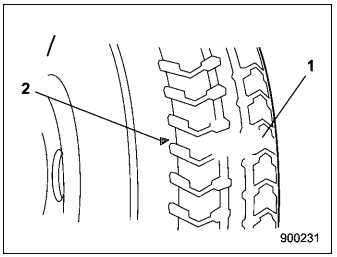
- Tread wear indicator bar
- Indicator location mark
- When the wear indicator appears on the tread, replace the tire.
- The temporary spare tire must be used only on a rear wheel. If a front wheel tire gets punctured, replace the wheel with a rear wheel and install the temporary spare tire in place of the removed rear wheel.

 Flat tires
If you have a flat tire while driving, never
brake suddenly; keep driving straight
ahead while gradually reducing speed.
Then slowly pull off the road to a safe
place...
Other information:
Kia Telluride (LQ2, 2027-2026) Owner's Manual: Curtain air bag
The curtain air bags are installed along both roof rails above the front and rear doors of the Kia Telluride. Their purpose is to help protect occupants seated next to the side windows during certain side impacts and rollover events. Curtain air bag The actual curtain air bag modules installed in your vehicle may differ slightly from those shown in the illustration...
Subaru Forester 2019-2026 Owners Manual: Enabling functions
When the procedure to disable the functions is performed again, a chirp will sound, and the functions are enabled. NOTE The keyless access function will be enabled only if you perform the procedure in the same manner used to disable the function (for example, when disabling by operating the driver’s door, the function will not be enabled even if you operate the access key fob)...
Categories
- Manuals Home
- RAB warning light (if equipped)
- Vehicle load limit – how to determine
- Unlock using PIN Code Access
- New on site
- Most important about car
Clock/date screen
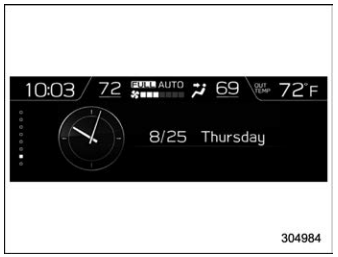
The time and date are displayed. You can adjust the time and date. For details, refer to “Clock”.
