
Subaru Forester: Controls and features / Automatic climate control system
The automatic climate control system helps heat, cool, ventilate, and dehumidify the Kia Telluride cabin to provide a comfortable environment for the driver and passengers.
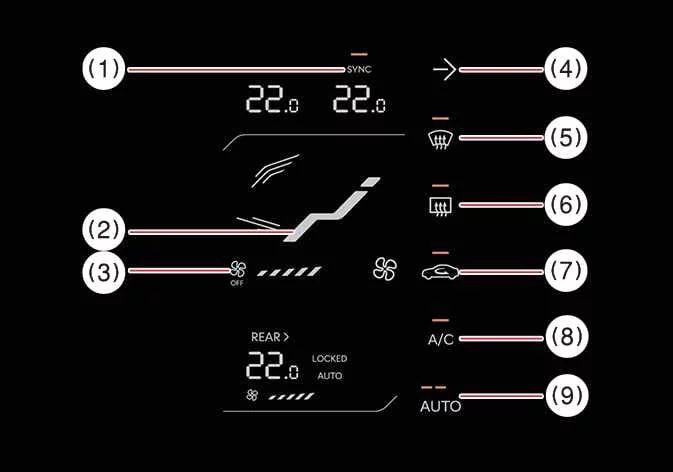
|
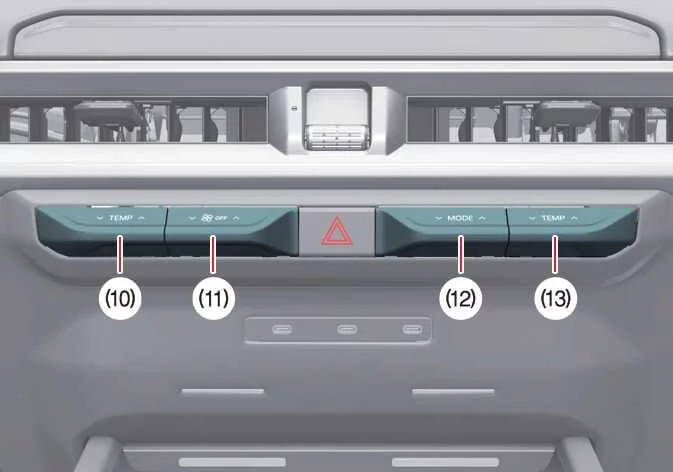
|
-
SYNC icon
-
Touch the SYNC icon to set the driver and passenger side temperatures to the same value.
-
-
Mode selection icon
-
Fan speed control/OFF icon
-
Infotainment system screen ON/OFF icon
-
Front windshield defroster icon
-
Rear window defroster icon
-
Air intake control button
-
Air conditioning A/C icon
-
AUTO automatic climate control icon
-
Driver's side temperature control lever
-
Fan speed control/OFF lever
-
Mode selection lever
-
Passenger's side temperature control lever
NOTE
-
Operating the blower fan while the vehicle is in the ACC position may discharge the 12V battery. Use the blower fan only when the vehicle is running whenever possible.
-
The rear seat airflow direction and air volume can be adjusted separately from the front seat controls. However, the rear seat temperature setting is linked to the front controls and may vary depending on use and surrounding conditions. For faster cabin heating, operate the front and rear air conditioning systems together.
- Automatic heating and air conditioning (A/C) operation
- Manual heating and air conditioning (A/C) operation
- Rear climate control
- Air conditioning (A/C) automatic drying
- Scheduled ventilation control
- Recirculate air: (if equipped)

 Automatic heating and air conditioning (A/C) operation
Tap the AUTO icon on the climate c..
Other information:
Subaru Forester 2019-2026 Owners Manual: Power steering warning light
While the engine is running, this warning light illuminates when a malfunction has been detected in the electric power steering system. CAUTION When the power steering warning light is illuminated, there may be more resistance when the steering wheel is operated...
Subaru Forester 2019-2026 Owners Manual: Vehicle finder function. Sounding a panic alarm
Vehicle finder function Use this function to find your vehicle parked among many vehicles in a large parking lot. Provided you are within 30 feet (10 meters) of the vehicle, pressing the lock/arm button three times in a 5-second period will cause your vehicle’s horn to sound once and its hazard warning flashers to flash three times...
Categories
- Manuals Home
- Changing a flat tire
- If the passenger’s frontal airbag OFF indicator illuminates and the ON indicator turns off even when the front passenger’s seat is occupied by an adult
- Instrument panel
- New on site
- Most important about car
Average vehicle speed
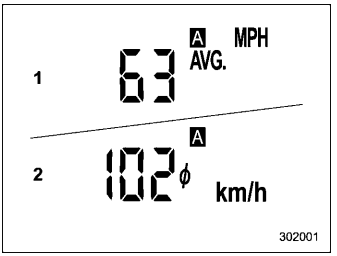
This display shows the average vehicle speed since the trip meter was last reset. Pressing the TRIP RESET switch toggles the display between the average vehicle speed corresponding to the A trip meter display and the average vehicle speed corresponding to the B trip meter display. When either of the trip meter displays is reset, the corresponding average vehicle speed value is also reset.
