
Subaru Forester: Front seat adjustment for power seat : (if equipped) / Cushion support
The cushion support adjustment feature allows the driver to fine-tune the seating position for improved comfort and additional thigh support. Proper adjustment can help reduce fatigue during extended trips and contribute to a more comfortable driving experience in the Kia Telluride.
|
|
Operation
-
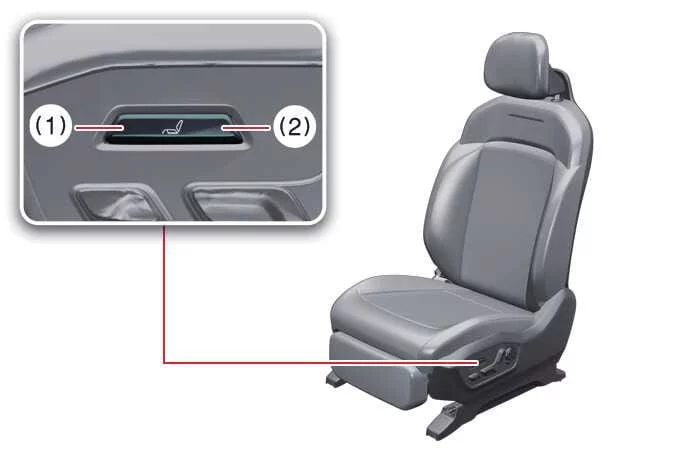
Push the cushion support adjustment switch upward (1) to raise the cushion support.
-
Push the cushion support adjustment switch downward (2) to lower the cushion support.
-
To raise the cushion support to its highest position, continue holding the switch for approximately 8 seconds. Once the maximum height has been reached, the mechanism will stop moving even if the switch remains pressed. Simply release the switch after the adjustment is complete.
 Leg support
..
 Seat bolster (Driver's seat) : (if equipped)
The adjustable driver's seat bolster is designed to provide additional side support, helping keep the driver securely positioned during cornering and improving overall comfort...
Other information:
Subaru Forester 2019-2026 Owners Manual: Hazard warning flasher
The hazard warning flasher is used to warn other drivers when you have to park your vehicle under emergency conditions. The hazard warning flasher works regardless of the position of the ignition switch. To turn on the hazard warning flasher, push the hazard warning flasher switch on the instrument panel...
Subaru Forester 2019-2026 Owners Manual: Auto Start Stop OFF switch
Auto Start Stop OFF switch Auto Start Stop OFF indicator light (yellow) (type A) Auto Start Stop OFF indicator light (yellow) (type B) If the Auto Start Stop OFF switch is pressed, operation of the Auto Start Stop system will be disabled. The Auto Start Stop OFF indicator light on the combination meter will then illuminate in yellow...
Categories
- Manuals Home
- Daytime running light system
- Steering Responsive Headlight (SRH)
- Alarm system setting
- New on site
- Most important about car
Driving information display
NOTE
You can set the units for both the multifunction display (black and white) and the combination meter at the same time. For details about setting the language and units, refer to “Type A combination meter” or “Menu screens”.
