
Subaru Forester 2019-2026 Owners Manual / Function settings
Subaru Forester: Function settings
- Function settings and adjustments on the combination meter display (color LCD)
- Function settings and adjustments performed by a dealer
 Warning and indicator lights
Seatbelt warning light / Front
passenger’s seatbelt warning ligh..
 Function settings and adjustments on the combination meter display (color
LCD)
Function settings and adjustments on the combination meter display (color
LCD)
If your vehicle is equipped with a combination meter display (color LCD),
setting adjustments to the following items can be manually
changed within the display to meet your personal requirements...
Other information:
Subaru Forester 2019-2026 Owners Manual: Front fog light indicator light / Headlight indicator light(if equipped)
Front fog light indicator light (if equipped) This indicator light illuminates while the front fog lights are illuminated. Headlight indicator light (if equipped) This indicator light illuminates under the following conditions. The light control switch is in the position and the following conditions are fulfilled...
Kia Telluride (LQ2, 2027-2026) Owner's Manual: Online factory authorized manuals (U.S. only)
To assist you with comprehensive vehicle upkeep, official factory-authorized publications and technical documentation for your Kia Telluride are readily available online at www.KiaTechinfo.com: Service manual This comprehensive service manual details routine maintenance schedules, diagnostic guidelines, and recommended step-by-step procedures for repairing engine and chassis components on your Kia Telluride...
Categories
- Manuals Home
- Automatic door locking/unlocking
- Vehicle load limit – how to determine
- Changing a flat tire
- New on site
- Most important about car
Type B multi-function display (color LCD)
Turn the ignition switch to “ON”.
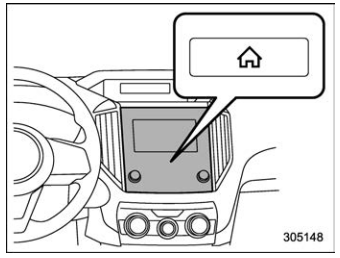
 button.
Select “Settings”.
Select “Vehicle”.
Select “Time/Date” and then select “Manual”.
button.
Select “Settings”.
Select “Vehicle”.
Select “Time/Date” and then select “Manual”.
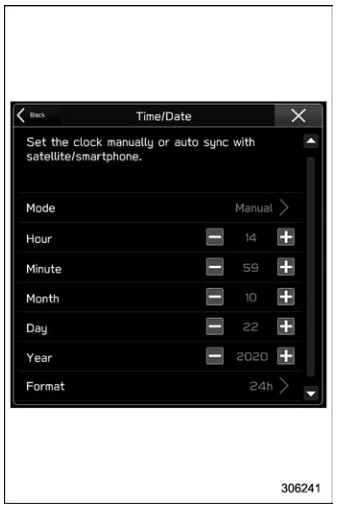
 to complete the
clock
setting.
to complete the
clock
setting.

Copyright © 2026 www.suforester5.com