
Subaru Forester: Smart key / Mechanical key
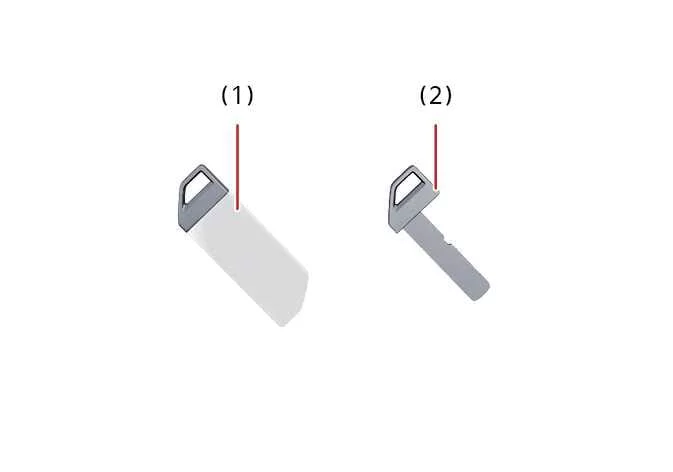
If the smart key battery becomes discharged or the Kia Telluride smart key does not operate normally, you can still lock or unlock the vehicle by using the built-in mechanical key (2).
|
|
To remove the mechanical key, carefully pull the mechanical key protective cover (1) away from the smart key until the mechanical key can be accessed and removed.
Smart key precautions
The Kia Telluride smart key may not function properly under any of the following conditions:
-
The smart key is located close to a powerful radio transmitter, such as a broadcasting station or airport communication equipment, which may interfere with normal signal transmission.
-
The smart key is positioned near a mobile two-way radio system.
-
The smart key is close to a mobile phone, particularly while the phone is making or receiving calls, sending messages, or transmitting data. To minimize interference, avoid storing the smart key directly beside your mobile phone.
-
Another vehicle's smart key is being operated near your Kia Telluride.
If the smart key does not operate correctly, first try using the spare key or unlock and lock the door with the mechanical key. If the problem continues, contact an authorized Kia dealer for inspection or assistance.
When the smart key is placed very close to a mobile phone or smartphone, the phone may block or weaken the key's signal. This is especially common while the phone is actively making or receiving calls, sending text messages, or transferring data. To ensure reliable operation, avoid carrying the smart key and your mobile phone together in the same pocket or storing them directly against each other.
If the smart key remains completely stationary for an extended period, its detection function (if equipped) may temporarily pause to conserve power. Simply pick up or move the smart key to reactivate the detection function.
NOTE
Losing the smart key
A maximum of two smart keys can be registered to a single Kia Telluride.
If both registered smart keys are lost, the vehicle cannot be started. Contact an authorized Kia dealer immediately for assistance. If necessary, have the vehicle towed to help protect it from unauthorized use or possible theft.
NOTE
Smart key
Keep the smart key away from water and other liquids. Exposure to moisture may permanently damage the transmitter and prevent it from operating correctly.
NOTE
-
To help prevent magnetic damage to the smart key, do not leave it near any of the following electrical devices:
-
Televisions
-
Personal computers
-
Mobile phones, cordless telephones, or battery chargers
-
Table lamps
-
Induction cooktops
-
-
If you need to leave your Kia Telluride with a parking attendant, remove and keep the mechanical key for yourself, and hand over only the smart key.
-
When carrying a smart key on an aircraft, avoid pressing any buttons while inside the cabin. If the key is stored in a bag or luggage, ensure the buttons cannot be pressed accidentally. Unintentional transmission of radio signals could interfere with aircraft equipment.
-
If the smart key becomes inoperative because it has been exposed to water or other liquids, the resulting damage is not covered by the manufacturer's vehicle warranty.
 Smart key
T..
 This device complies with Part 15 of the FCC rules.
Operation of this device is subject to the following two conditions:
This device may not cause harmful interference.
This device must accept any interference received, including interference that could cause undesired operation...
Other information:
Kia Telluride (LQ2, 2027-2026) Owner's Manual: Dual wide sunroof: (if equipped)
If your Kia Telluride is equipped with a dual wide sunroof, you can conveniently slide or tilt the front glass panel using the sunroof switch located on the overhead console. The system is designed to provide additional ventilation, natural light, and a more open cabin atmosphere while maintaining easy operation...
Kia Telluride (LQ2, 2027-2026) Owner's Manual: Limitations of Forward Collision-Avoidance Assist
While the advanced safety suite in your Kia Telluride is engineered to provide an extra layer of protection on the road, it is important to acknowledge that the Forward Collision-Avoidance Assist (FCA) system has functional limitations. For detailed information regarding the specific constraints of the interior camera system, please consult the section dedicated to the Forward Attention Warning (FAW)...
Categories
- Manuals Home
- Daytime running light system
- Reclining the seatback (if equipped)
- Automatic door locking/unlocking
- New on site
- Most important about car
Windshield wiper and washer switches
The wiper operates only when the ignition switch is in the “ON” or “ACC” position.
