
Subaru Forester: Power window operation / Operating the window
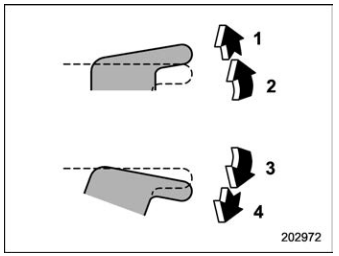
With one-touch auto up and down feature
- Automatically close*
- Close
- Open
- Automatically open*
*: To stop the window halfway, operate the switch to the opposite side.
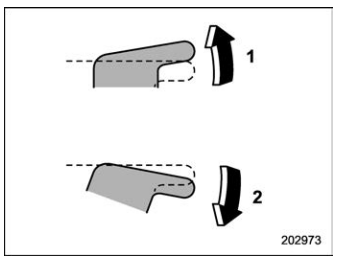
Without one-touch auto up and down feature
- Close
- Open
NOTE
Avoid the following.
- Continuously operating a switch in the same direction after the window is fully closed or fully opened.
- Continuously operating three or more switches all at once in the same direction after the windows are fully closed or fully opened.
Either of the operations described above may cause the power window breaker to operate making it impossible to open or close the window. Be sure to initialize the power windows. Refer to “Initialization of power window (windows with off delay function)”.

 Anti-entrapment function (windows with one-touch auto up and down function)
While closing the window automatically, if
the window senses a substantial enough
object trapped between the window and
the window frame, it automatically moves
down slightly and stops...
Other information:
Kia Telluride (LQ2, 2027-2026) Owner's Manual: Limitations of Reverse Parking Collision-Avoidance Assist
The Reverse Parking Collision-Avoidance Assist feature in your Kia Telluride is engineered to offer supplemental safety support, but certain specific conditions can prevent it from triggering warnings or initiating emergency braking. System performance may be limited, delayed, or entirely suspended under the following circumstances, even if pedestrians, vehicles, or physical objects are detected directly behind your vehicle: Vehicle-related issues, mechanical modifications, or physical damage: Installing any non-factory equipment, aftermarket accessories, or structural modifications that interfere with sensor sightlines...
Kia Telluride (LQ2, 2027-2026) Owner's Manual: This device complies with Part 15 of the FCC rules.
Operation of this equipment is subject to the following two standard conditions: This device may not cause harmful radio or electromagnetic interference, and this device must accept any interference received, including unexpected interference that may cause undesired operation of the vehicle system...
Categories
- Manuals Home
- RAB warning light (if equipped)
- Power steering warning light
- Disabling functions
- New on site
- Most important about car
Average vehicle speed
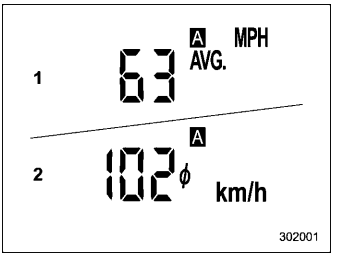
This display shows the average vehicle speed since the trip meter was last reset. Pressing the TRIP RESET switch toggles the display between the average vehicle speed corresponding to the A trip meter display and the average vehicle speed corresponding to the B trip meter display. When either of the trip meter displays is reset, the corresponding average vehicle speed value is also reset.
