
Subaru Forester: Rear seat adjustment / Relaxion comfort seat (front seats): (if equipped)
The Relaxion comfort seats in the Kia Telluride are designed to distribute body weight more evenly and reduce pressure on areas that experience the greatest strain during extended periods of sitting. By optimizing seating posture, the system helps minimize fatigue and enhances overall comfort while resting inside the vehicle.
|
WARNING
-
Never use the Relaxion comfort seat while the Kia Telluride is in motion. Operating this feature during driving may distract the driver and increase the risk of injury in the event of sudden braking or a collision.
-
Keep your body, clothing, and personal belongings clear of all moving seat components while the Relaxion comfort seat is operating.
-
Because the seating position changes during operation, use the Relaxion comfort seat only while the vehicle is parked, stopped, or being used for rest.
-
If the Relaxion comfort seat is operated while wearing a seat belt, the shoulder belt may no longer fit firmly across the chest. For this reason, operate the function only when the vehicle is safely parked or stopped.
WARNING
-
Do not activate the Relaxion comfort seat while the vehicle is moving. The shoulder belt may not remain properly positioned across your chest.
-
Do not use the Relaxion comfort seat if luggage or other objects are placed on the rear seats.
-
Do not operate the Relaxion comfort seat unless the rear seats are fully upright and positioned at their rearmost locations.
-
Before activating the function, make sure there is sufficient clearance between the seat, the instrument panel, the rear seatbacks, passengers, and any cargo stored behind the front seats.
Operating relaxion comfort seat
|
|
Operation
-
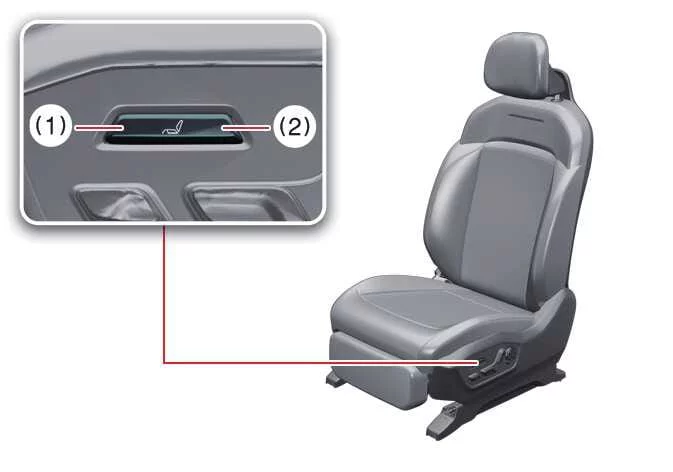
Press the rear portion of the Relaxion comfort seat switch (2) to move the seat into the desired relaxation position.
-
Release the switch once the seat reaches the preferred position.
-
After the Relaxion comfort seat has completed its movement, fine-tune the seating position using the standard seat adjustment controls if additional comfort is desired.
Non-operating condition(s)
-
When the driver's seat is selected and the transmission is in R (Reverse), N (Neutral), or D (Drive).
-
When vehicle speed exceeds approximately 2 mph (3 km/h) for the driver's seat.
-
When the Integrated Memory System requires initialization.
Returning relaxion comfort seat
Operation
-
While the seat is in the Relaxion comfort position, press the front portion of the Relaxion comfort seat switch (1) to return the seat to its stored position.
Do not operate both Relaxion seat switches simultaneously, as doing so may damage the Relaxion comfort seat system.
Saving the return position of the passenger seat
To store the current passenger seat position as the return position, adjust the passenger seat to the preferred location, then press the front portion (1) of the Relaxion switch located beneath the seat cushion three times within two seconds. The current position will be saved as the return position.
Non-operating condition(s)
-
When the driver's seat is selected and the transmission is in R (Reverse), N (Neutral), or D (Drive).
-
When vehicle speed exceeds approximately 2 mph (3 km/h) for the driver's seat.
-
When the Integrated Memory System requires initialization.
NOTE
Never press both Relaxion comfort seat switches at the same time. Simultaneous operation may damage the seat control system.
TIP
To save a new passenger return position, first adjust the seat to the preferred location, then press the front portion (1) of the Relaxion switch beneath the seat cushion three times within two seconds.
Resetting relaxion comfort seat
|
|
Driver's side
Operation
-
Open the driver's door while the Kia Telluride is stopped and the vehicle is in the ON position.
-
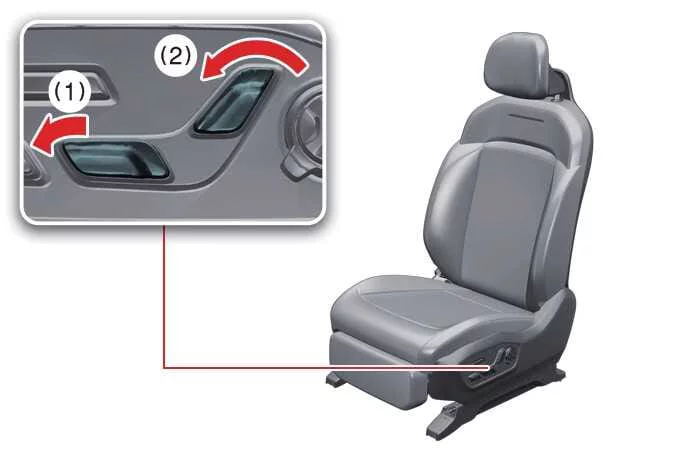
Move the driver's seat completely forward and adjust the seatback to its most upright position using the forward/backward and seatback angle adjustment switches.
-
Press and hold the driver's seatback angle adjustment switch while simultaneously pushing the forward portion of the forward/backward adjustment switch for approximately two seconds.
NOTE
Before starting the initialization procedure, confirm that there are no passengers, obstacles, or objects near the driver's seat that could interfere with seat movement.
-
The initialization procedure operates as follows:
-
The process begins with an audible beep.
-
The seat and seatback automatically move rearward while a continuous beep is heard.
-
The seat and seatback then return toward the center position, and the initialization process ends with a final confirmation beep.
-
Non-operating condition(s)
The initialization process will stop automatically under any of the following conditions:
-
The driver's seat adjustment switch is pressed.
-
The vehicle speed exceeds approximately 3 mph (5 km/h).
-
The driver's door is closed.
If the driver's seat stops moving and the beep ends before initialization is complete, repeat the initialization procedure.
After initialization has finished, readjust the driver's seat to the preferred position and save the settings again using the Driving Position Memory System.
Passenger's side
-
Open the passenger door while the vehicle is stopped and the Kia Telluride is in the ON position.
-
Move the passenger seat completely forward and adjust the seatback to its most upright position using the passenger seat adjustment controls.
-
Press and hold the passenger seatback angle adjustment switch while simultaneously pushing the forward portion of the passenger seat forward/backward adjustment switch for approximately two seconds.
NOTE
Before beginning passenger seat initialization, verify that there are no obstacles around the seat that could interfere with its movement.
-
The initialization procedure operates as follows:
-
An audible beep indicates the beginning of initialization.
-
The seat and seatback automatically move rearward while a continuous beep is heard.
-
The seat and seatback return toward the center position, and the process finishes with a final confirmation beep.
-
Non-operating condition(s)
The initialization procedure will stop under the following condition:
-
The passenger seat adjustment switch is pressed.
NOTE
-
If the passenger seat stops moving before initialization is completed, restart the initialization procedure.
-
After initialization is complete, adjust the passenger seat to the desired seating position before use.

 Headrest (for front seat)
The driver's and front passenger's seats in the Kia Telluride are equipped with adjustable headrests designed to enhance both occupant comfort and overall safety...
Other information:
Kia Telluride (LQ2, 2027-2026) Owner's Manual: Recommended lubricants and capacities. Recommended SAE viscosity (thickness) number
Maintaining the long-term reliability and peak performance of your Kia Telluride depends heavily on using the exact lubricants and fluids specified by the manufacturer. Utilizing the correct high-quality fluids not only safeguards the intricate components of the engine and powertrain against premature wear but also optimizes fuel efficiency and overall driving dynamics...
Kia Telluride (LQ2, 2027-2026) Owner's Manual: Economical operation
The fuel economy of your Kia Telluride depends largely on how, where, and when you drive. Driving habits, road conditions, traffic, vehicle load, and maintenance condition all affect fuel consumption. To operate your vehicle as efficiently as possible and help reduce fuel and repair costs, follow these driving recommendations: Drive smoothly and accelerate at a moderate rate...
Categories
- Manuals Home
- Instrument panel
- Disabling functions
- RAB warning light (if equipped)
- New on site
- Most important about car
Driving information display
NOTE
You can set the units for both the multifunction display (black and white) and the combination meter at the same time. For details about setting the language and units, refer to “Type A combination meter” or “Menu screens”.
