
Subaru Forester: Access key fob – if access key fob does not operate properly / Starting engine
- Apply the parking brake.
- Shift the select lever to the “P” (Park) position.
- Depress the brake pedal.
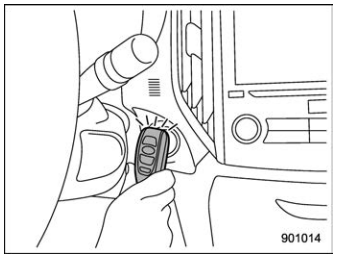
- Hold the access key fob with the
buttons facing you, and touch the pushbutton
ignition switch with it.
When the communication between the access key fob and the vehicle is completed, a chime (ding) will sound. At the same time, the push-button ignition switch turns to the “ACC” or “ON” position.
- After the push-button ignition switch turns to the “ACC” or “ON” position, while depressing the brake pedal, press the push-button ignition switch.
NOTE
If the engine does not start even though the above procedure was followed precisely, contact your SUBARU dealer.

 Rear gate – if the rear gate cannot be opened
In the event that you cannot open the rear
gate by operating the rear gate opener
button, you can open it from inside the
cargo area.
Remove the access cover at the
bottom-center of the rear gate trim using
a flat-head screwdriver wrapped with vinyl
tape or a cloth...
Other information:
Kia Telluride (LQ2, 2027-2026) Owner's Manual: Vehicle Identification Number (VIN)
Your Vehicle Identification Number (VIN) is the unique fingerprint of your Kia Telluride. It is required for all official vehicle registration processes, insurance documentation, and any legal matters related to your ownership of the vehicle. Figure 1...
Kia Telluride (LQ2, 2027-2026) Owner's Manual: Winter driving
Severe winter conditions introduce unique challenges that can accelerate tire wear and impact overall vehicle performance. To navigate the colder months with confidence and maintain the peak condition of your Kia Telluride, it is essential to follow the comprehensive guidelines outlined in these sections...
Categories
- Manuals Home
- Low fuel warning light
- Reverse Automatic Braking (RAB) system ON/OFF setting
- Instrument panel
- New on site
- Most important about car
Outside temperature indicator
The outside temperature is displayed on the multi-function display (color LCD).
NOTE
The outside temperature indicator shows the temperature around the sensor. However, the temperature may not be indicated correctly or the update may be delayed in the following conditions. While parking or driving at low speeds When the outside temperature changes suddenly (example: when going in and out of an underground parking area or when passing through a tunnel) When starting the engine after being parked for a certain period of time The temperature unit cannot be changed.
Copyright © 2026 www.suforester5.com