
Subaru Forester: Tires and wheels / Tire rotation
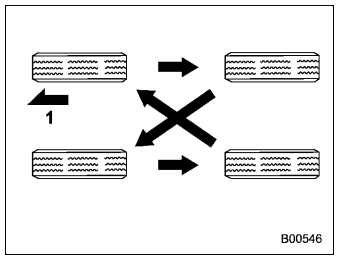
Vehicles equipped with 4 nonunidirectional tires
- Front
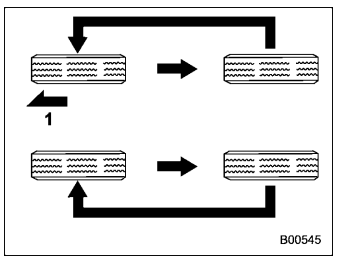
Vehicles equipped with unidirectional tires
- Front
Tire wear varies from wheel to wheel. Move the tires to the positions shown in the illustration each time they are rotated. For the tire rotation schedule, refer to the “Warranty and Maintenance Booklet”.
Replace any damaged or unevenly worn tires at the time of rotation. After tire rotation, adjust the tire pressures and make sure the wheel nuts are correctly tightened.
After driving approximately 600 miles (1,000 km), check the wheel nuts again and retighten any nut that has become loose.
For handling alloy wheels, refer to “Alloy wheels”.

 Tire replacement
The wheels and tires are important and
integral parts of your vehicle’s design; they
cannot be changed arbitrarily. The tires
fitted as standard equipment are optimally
matched to the characteristics of the
vehicle and were selected to give the best
possible combination of running performanc..
Other information:
Subaru Forester 2019-2026 Owners Manual: Jump starting
WARNING Battery fluid is SULFURIC ACID. Do not let it come in contact with the eyes, skin, clothing or the vehicle.If battery fluid gets on you, thoroughly flush the exposed area with water immediately. Get medical help if the fluid has entered your eyes...
Subaru Forester 2019-2026 Owners Manual: Trailer towing tips
CAUTION For models equipped with the BSD (Blind Spot Detection) and RCTA (Rear Cross Traffic Alert) driving support systems, when towing a trailer, press the BSD/ RCTA OFF switch to deactivate the system. The system may not operate properly due to the blocked radar waves...
Categories
- Manuals Home
- Reverse Automatic Braking (RAB) system ON/OFF setting
- Automatic door locking/unlocking
- Reclining the seatback (if equipped)
- New on site
- Most important about car
Average vehicle speed
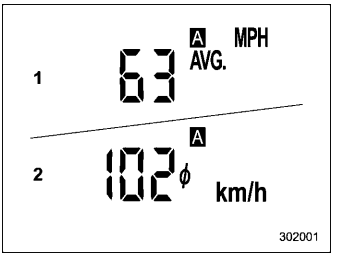
This display shows the average vehicle speed since the trip meter was last reset. Pressing the TRIP RESET switch toggles the display between the average vehicle speed corresponding to the A trip meter display and the average vehicle speed corresponding to the B trip meter display. When either of the trip meter displays is reset, the corresponding average vehicle speed value is also reset.
