
Subaru Forester 2019-2026 Owners Manual / Interior equipment / Cargo area cover (if equipped) / To install the cover housing
Subaru Forester: Cargo area cover (if equipped) / To install the cover housing
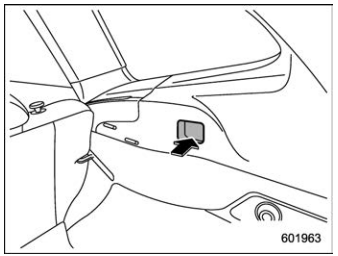
- Insert the protrusion located on the
right end of the sleeve into the recess of
the retainer.
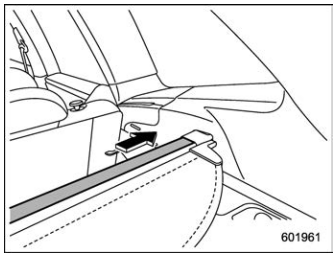
- Push the cover housing to the right side and shorten the bar.
- Insert the other protrusion into the recess of the other retainer.

 Cargo tie-down hooks
The cargo area is equipped with several
tie-down hooks so that cargo can be
secured with a cargo net or ropes.
When using the tie-down hooks, turn them
down out of the storing recesses...
Other information:
Subaru Forester 2019-2026 Owners Manual: Stowage of the cargo area cover
The cargo area cover can be stowed in under the cargo floor. Pull the strap to open the center part of the cargo floor lid, and then remove the lid. Remove the left and right parts of the cargo floor lid. Stow the cover housing in the cargo area end...
Kia Telluride (LQ2, 2027-2026) Owner's Manual: Daytime running light (DRL)
The Daytime Running Light (DRL) system helps improve the visibility of your Kia Telluride to other motorists during daylight driving. DRLs are particularly beneficial during early morning hours, late afternoon, overcast weather, and other situations where additional vehicle visibility enhances road safety...
Categories
- Manuals Home
- Alarm system setting
- Steering Responsive Headlight (SRH)
- Low fuel warning light
- New on site
- Most important about car
How to get the source code using the open source
Free/Open Source Software Information
This product contains Free/Open Source Software (FOSS).
The license information and/or the source code of such FOSS can be found at the following URL.
http://www.globaldenso.com/en/opensource/ivi/subaru/

Copyright © 2026 www.suforester5.com